
PrivateVPN, though less renowned than ExpressVPN, NordVPN, or Surfshark, surprises with its impressive speeds. I conducted PrivateVPN speed test in Hong Kong using nine (9) different server locations scattered worldwide.
According to DataProt, approximately 43% of users employ VPN primarily for security reasons, followed by 26% using it for streaming purposes. My VPN reviews in Hong Kong are unbiased and based on key features like speed, servers, security features, customer service, etc.
During the evaluation of PrivateVPN, I also checked its ability to overcome the geo-blocks on different streaming platforms like Netflix, Hulu, BBC iPlayer, ESPN+, etc., and it unblocked the sites within a minute.
Key Takeaways:
- Impressive Global Performance: PrivateVPN consistently delivered high speeds across nine global server locations, with download speeds ranging from 76.59 Mbps to 93.25 Mbps, making it a strong competitor to more well-known VPNs.
- Reliable for Streaming and Torrenting: PrivateVPN effectively bypasses geo-blocks on popular platforms like Netflix, Hulu, and BBC iPlayer, providing a smooth, buffer-free streaming experience alongside optimized P2P servers for torrenting.
- Slight Variations in Upload Speeds: While most servers showed excellent upload speeds, a few, such as the Austria server, experienced significant drops, though the overall performance remained strong for browsing, streaming, and file sharing.
Quick Results of PrivateVPN Speed Test in Hong Kong:
If you’re in a hurry and don’t want to stick around throughout the entire article, here’s a brief table with all the results of PrivateVPN speed test in Hong Kong, compiled for your convenience.
| Server location | Download speed | Upload speed | Pings |
|---|---|---|---|
| Austria | 80 Mbps | 5 Mbps | 384 ms |
| Canada | 92.92 Mbps | 93.5 Mbps | 282 ms |
| Denmark | 87.75 Mbps | 92.17 Mbps | 137 ms |
| France | 92.17 Mbps | 93.42 Mbps | 128 ms |
| Greece | 76.59 Mbps | 93.42 Mbps | 294 ms |
| Italy | 93.25 Mbps | 91.34 Mbps | 127 ms |
| Netherlands | 86.84 Mbps | 94.84 Mbps | 128 ms |
| UK | 88.42 Mbps | 84.84 Mbps | 134 ms |
| USA | 89.59 Mbps | 91.84 Mbps | 212 ms |
If you want the best fastest VPN in Hong Kong, you can sign up for PrivateVPN and enjoy unlimited gaming, streaming and browsing.
Get PrivateVPN in Hong Kong Now! 30 Days Money-Back Guarantee
PrivateVPN Speed Test for Hong Kong in 2024 [In-depth Analysis]
In order to get a good idea of how PrivateVPN would perform across different servers, I performed the PrivateVPN speed test for Hong Kong. I tested nine (9) different server locations of PrivateVPN with my 100 Mbps internet connection. Here’s how my testing went when checking the speed of this VPN.
1. Austria
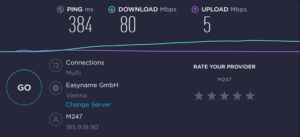
Speed test results of PrivateVPN’s Austria servers.
First, I connected to the Austrian server. After running the test, I managed to get a download speed of 80 Mbps, which is quite good, however, the upload speed that I got was only 5 Mbps. That’s a major drop in upload speed. As for pings, it peaked at 384 ms.
2. Canada
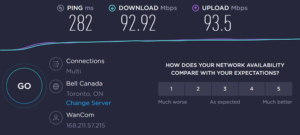
The Canadian server, on the other hand, performed exceptionally well during PrivateVPN speed test in Hong Kong. Once connected, I noted down my download speed at 92.92 Mbps, my upload speed at 93.5 Mbps, and my pings at 282 ms.
3. Denmark
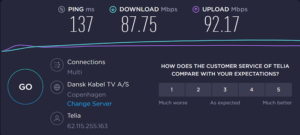
With the Denmark server location of PrivateVPN, I was quite surprised again that I managed to get a download speed of 87.75 Mbps, an upload speed of 92.17 Mbps with only 137 ms pings. So far, impressed.
4. France
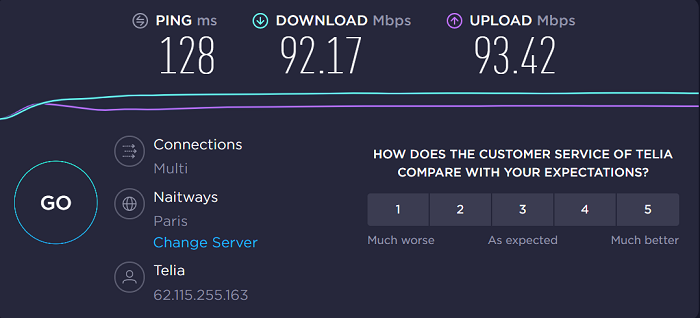
With the French server, things got even better. This time, I managed to get a download speed of 92.17 Mbps, an upload speed of 93.42 Mbps with only 128 ms pings.
5. Greece
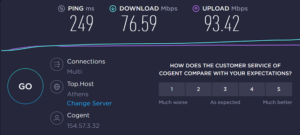
The Greece server of PrivateVPN also performed flawlessly. When I ran the PrivateVPN speed test in Hong Kong, it managed to output 76.59 Mbps download, 93.42 upload speed with 249 ms pings.
6. Italy
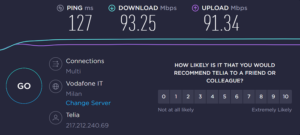
Just like other server locations, the Italian server also performed great. When I ran the test, PrivateVPN managed to output 93.25 Mbps download speed and an upload speed of 91.34 with just 127 ms pings.
7. Netherlands
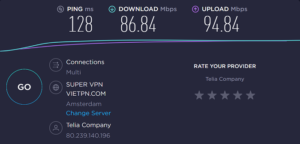
Next, I moved on to the Netherlands server. While connected to the Amsterdam location for PrivateVPN speed test in Hong Kong, I managed to get an 86.84 Mbps downloading speed, 94.84 Mbps upload speed, and 128 ms pings.
8. UK
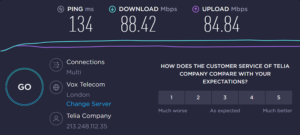
With the UK London server, my download speed again jumped back to the upper 80s. Once I ran the test, PrivateVPN managed to deliver a download speed of 88.42 Mbps, an upload speed of 84.84 with just 134 ms pings.
9. USA
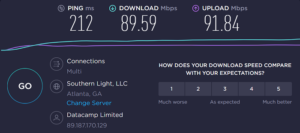
Last but not least, I also ran a PrivateVPN speed test in Hong Kong while connected to the U.S Atlanta server. This time I got a download speed of 89.59 Mbps and an upload speed of 91.84 Mbps with 212 ms pings.
In case you face PrivateVPN not working in Hong Kong issue, an in-depth guide is available. You can contact the customer support team, which is available 24/7.
What is the Speed Difference between Using PrivateVPN on Mobile versus Desktop in Hong Kong?
The speed difference between using PrivateVPN on mobile versus desktop typically depends on several factors, including device performance, network conditions, and VPN server load.
Generally, there is no significant inherent speed difference between mobile and desktop platforms, as PrivateVPN offers optimized apps for both.
However, mobile connections may experience slightly lower speeds due to weaker Wi-Fi connections or mobile data limitations, while desktop devices connected via Ethernet may offer more stable and faster speeds. Testing on each platform under similar conditions (e.g., same Wi-Fi network) will provide a more accurate comparison.
What Tools Can be Used to Measure PrivateVPN’s Speed in Hong Kong?
To measure PrivateVPN‘s speed, several tools can be used to test the connection’s performance. Popular options include Ookla’s Speedtest, which measures download and upload speeds, latency, and ping for accurate results.
Fast.com, powered by Netflix, is another tool that focuses on measuring streaming-related speeds, which is useful for assessing VPN performance with platforms like Netflix.
Additionally, Google’s built-in speed test can provide a quick overview of how well the VPN is performing.
More advanced users may also use PingPlotter to monitor real-time speed variations across VPN connections. By testing multiple servers with these tools, you can get a comprehensive view of PrivateVPN’s speed.
A Bit More about PrivateVPN
PrivateVPN is a super underrated VPN. Let me tell you why. It offers 100 servers in 60 countries that are capable of unblocking geo-blocked streaming services like Hulu, Amazon Prime, Netflix, and more.
Aside from working with streaming services, it also actually offers optimized P2P servers. You can anonymously download torrents too as PrivateVPN is good for torrenting in Hong Kong. How great is that?
In addition, it offers apps for almost all operating systems. Aside from using it on your phone or laptop, you can even set up PrivateVPN on your FireStick devices, Rok, and Kodi too.
Best of all, PrivateVPN is super affordable. Its subscription plans start from just $2.55/mo. In addition, it also offers a generous free trial so you can test out the service risk-free.
That’s not all. This VPN also comes with a few other bells and whistles, which you can check out in my in-depth PrivateVPN review Hong Kong.
Get PrivateVPN in Hong Kong Now 30 Days Money-Back Guarantee
More Speed Test Results Other than PrivateVPN:
- PureVPN Speed Test in Hong Kong
- Surfshark Speed Test in Hong Kong
- NordVPN Speed Test in Hong Kong
- ExpressVPN Speed Test in Hong Kong
FAQs – PrivateVPN Speed Test in Hong Kong
How fast is PrivateVPN?
PrivateVPN typically provides solid speeds for streaming and browsing, but its performance may vary based on server location and load. It is known for reliable connections, though it’s generally not the fastest compared to top-tier VPNs.
Can you test VPN speed?
Yes, you can test VPN speed using tools like Ookla’s Speedtest, Fast.com, or other speed testing sites while connected to your VPN. This helps evaluate download, upload speeds, and latency with the VPN.
How do I run a speed test on a virtual private network?
To run a speed test, connect to your VPN, visit a speed test website (e.g., Speedtest.net), and run the test to measure download, upload speeds, and ping. Ensure you test multiple servers to get average speeds.
Which VPN has the fastest speed?
ExpressVPN is often regarded as one of the fastest VPNs due to its optimized servers and Lightway protocol, offering high-speed connections for streaming, browsing, and downloading without significant slowdowns.
Does PrivateVPN impact upload speeds in Hong Kong?
PrivateVPN can slightly impact upload speeds in Hong Kong, but the effect is usually minimal. It offers reliable upload speeds suitable for most tasks, including video calls and file sharing, depending on server load and location.
What is the fastest PrivateVPN server in Hong Kong?
The fastest PrivateVPN server in Hong Kong typically depends on current server load and proximity to your location, but servers in Paris are generally the most optimized for speed and performance.
Can PrivateVPN stream Netflix in Hong Kong without buffering issues?
Yes, PrivateVPN can stream Netflix in Hong Kong without buffering issues, especially on its optimized streaming servers. It is known for bypassing geo-restrictions and maintaining good streaming quality.
What is the average download speed of PrivateVPN in Hong Kong?
The average download speed of PrivateVPN in Hong Kong, based on speed tests, is around 92.17 Mbps. This makes it one of the faster VPNs for users in France, ensuring smooth browsing, streaming, and downloading experiences.
Wrapping up!
I was impressed by how it performed once I was done with the PrivateVPN speed test in Hong Kong. If you take a look at the table at the start of this article, you’ll notice that using the Austrian IP address, only the Austrian server showed a massive drop in the upload speed. However, other servers managed to output speeds in the upper 80s and 90s.
If I talk about real-world usability experience, then PrivateVPN is fast. The whole time I was testing, it never felt like anything burdened my internet speeds. I easily downloaded large torrent files and streamed HD Netflix content with PrivateVPN.