$4.99/mo - Save 61% With Exclusive 2-Year Plan + 4 Months Free!Claim Now
7 Best VPN for Linux in Australia: Expert Picks & Setup Guide
Last updatedFebruary 11, 2025
Naveen Zehra
Editor
Naveen Zehra, an editor at VPNRanks.com, has a decade of writing experience. With a strong background in tech and privacy, she creates easy VPN guides. Passionate about privacy, she understands data tracking and its impacts, ensuring her insights resonate with readers.
Naveen Zehra, an editor at VPNRanks.com, has a decade of writing experience. With a strong background in tech and privacy, she creates easy VPN guides. Passionate about privacy, she understands data tracking and its impacts, ensuring her insights resonate with readers.
Linux users often face limited options when it comes to VPN services. Many VPNs are unsuited for Linux, lacking user-friendly features or strong support for different Linux distributions. Despite this, some VPN providers have tried to create services that are easy to use and effective for Linux users. In my search for the best VPN for Linux in Australia, I tested many services to see which ones really work well on Linux.
I looked for the best VPN for Australia that is easy to set up, whether it uses a graphical user interface (GUI) or a simple command-line interface (CLI). My selected VPNs stand out because they offer solid security, support for various Linux distributions, and reliable customer service. Given the staggering statistic that there are 1.5 billion VPN users worldwide, it’s crucial that Linux users find robust solutions that cater specifically to their needs.
Key Takeaways:
Quick Comparison Table: The blog provides a comparative overview of the top VPNs for Linux, including their pricing, security features, and user interface options.
VPN Setup Guides: Detailed guides for setting up different VPN protocols on Linux, such as PPTP and OpenVPN, are provided.
Kill Switch Setup: Instructions for setting up a kill switch on Linux to enhance security are outlined.
Linux Distribution Compatibility: The blog discusses VPN compatibility with different Linux distributions and emphasizes that VPN support can vary among them.
VPNs to Avoid: Some VPNs are advised against using them due to poor privacy practices or technical shortcomings.
Free VPNs: The limitations and risks of using free VPNs are discussed, particularly concerning privacy and speed.
Quick Overview – Best VPN for Linux in Australia [2024 Updated]
Looking to find out which VPN works on Linux in Australia? Here’s a quick overview of the best VPN for Linux 2024 in Australia:
ExpressVPN is the #1 VPN Linux in Australia. It offers very fast speeds and powerful security features, ensuring a seamless and secure browsing experience for users in Australia.
Surfshark provides high-speed connections and a user-friendly Linux GUI, making it an excellent choice for budget-conscious users seeking reliable privacy protection in Australia.
PIA’s Linux client is optimized for torrenting, offering features like split tunneling and advanced security options, making it an ideal choice for Linux users in Australia who prioritize secure file sharing.
NordVPN boasts features tailored to Linux users, ensuring secure browsing with advanced encryption protocols and dedicated Linux applications, making it a top choice for privacy-conscious individuals in Australia.
With a focus on simplicity and ease of use, CyberGhost offers a streamlined experience for Linux users, providing intuitive applications and features designed to enhance privacy and security while browsing from Australia.
IPVanish offers a reliable and versatile VPN solution for Linux users in Australia, with features tailored to the platform, including compatibility with various Linux distributions and robust security measures to safeguard online privacy.
PrivateVPN – Suitable OpenVPN CLI App for Linux in Australia
PrivateVPN offers port forwarding by default, integrating the robust OpenVPN UDP protocol and SOCKS5 proxy for reducing ping and increasing security. This combination ensures a reliable connection, making it ideal for secure, high-speed online activities on Linux in Australia.
The following factors were considered while compiling the list of top Linux VPN services in Australia:
There is a Linux app available, so no manual configuration is required.
Fast speeds
Powerful security measures and leakproof privacy.
There are no activity or IP address logs.
Can access geo-restricted websites, applications, and streaming services.
Works with most distros.
Large server network.
The best Linux VPN in Australia encrypts all data sent or received from a device and redirects it via a server at a location chosen by the user. Among the many advantages is increased security when using public Wi-Fi and accessing content normally restricted by location.
7 Best VPNs for Linux in Australia in 2024 [Detailed Analysis]
Seeking to discover which VPN works best in Australia with Linux? While many VPN providers offer Linux support, most require you to rely on OpenVPN configuration files. Moreover, you might also find yourself dealing with manual server lists.
So after painstakingly filtering out 45+ VPNs, I have managed to compile a list of the 7 best VPNs for Linux. Let’s check out what’s the best VPN for Linux in Australia:
ExpressVPN is the best VPN for Linux in Australia. It offers a dedicated app for Linux with unparalleled security, privacy, and unblocking capabilities.
ExpressVPN offers a seamless experience, allowing users to effortlessly switch between UDP and TCP over the OpenVPN protocol. It ensures reliable performance and user anonymity, cementing its position as the top VPN choice for Linux users in Australia.
ExpressVPN’s robust server network includes thousands of servers in 105countries, reflecting its dedication to providing the best experience for Linux users. This extensive server count ensures premium performance, reliability, and versatility for Australians.
As for security, this VPN offers 256-bit AES encryption, a staunch data defender akin to Linux’s security ethos. Its strict no-logging policy, Network Lock, and DNS leak protection mirror Linux’s commitment to privacy and transparency.
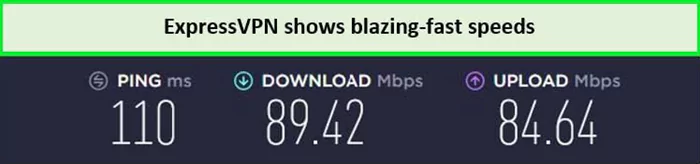
During the ExpressVPN speed test in Australia on its US server, I observed a minimal drop of only 11%. ExpressVPN delivered impressive speeds on the 100 Mbps internet connection. With a download speed of 89.42 Mbps and an upload speed of 84.64 Mbps, these speeds demonstrate that the ExpressVPN Linux combo proves to be a good option for users.
Using these speeds, I could enjoy streaming easily on Linux in Australia.
ExpressVPN seamlessly integrates with Linux distributions like Debian, Fedora, Kali, and CentOS, extending compatibility to routers, smart TVs, and gaming consoles. It offers reliable and secure connectivity for users in Australia, epitomizing flexibility and ease of use in VPN solutions for Linux enthusiasts.
Apart from that, the ExpressVPN free trial in Australia offers a risk-free opportunity to test its capabilities. After testing the compatibility of the VPN, if it meets your expectations, you can use the paid version of the VPN.
In short, ExpressVPN is the best VPN Linux due to its exceptionally advanced protocols. However, if you are looking for more information, then you can read the ExpressVPN review in Australia.
Surfshark – Budget-friendly VPN for Linux Users in Australia
Surfshark stands out as a highly popular and budget-friendly VPN that consistently performs well across various operating systems, particularly excelling in compatibility with Linux in Australia. It is known for its affordability, unlimited device policy, and intuitive interface for all user levels for a budget-friendly cost.
If you’re considering Surfshark VPN with Linux, it’s important to note that installation requires Debian distribution. You’ll need sudo/root permissions during the setup process. One drawback of Surfshark on Linux is that it only supports OpenVPN in UDP and TCP modes, unlike some competitors that offer WireGuard Linux GUI support.
The Surfshark Linux GUI app is user-friendlier compared to the previous command-line versions. Apart from its smart interface, it is packed with most features available on the Surfshark apps of other operating systems. Now, Linux users can enjoy features like CleanWeb, MultiHop, and DNS/IP leak protection. It still lacks a kill switch and auto-connect, but I hope to get that shortly.
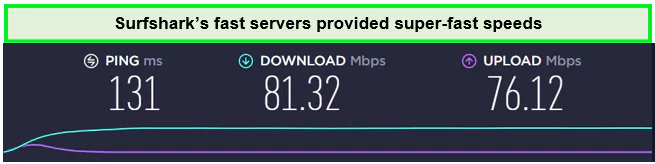
Surfshark offers 3200+ servers in 100 countries, making the use of Linux easy worldwide. Along with thousands of servers, Surfshark offers fast speeds as well. When I conducted a Surfshark speed test in Australia on its US server, I received a download speed of 81.32 Mbps and an upload speed of 76.12 Mbps on the 100 Mbps internet connection.
These speeds were fast enough to enjoy data-intensive activities on Linux without delays in Australia.
To summarize, if you’re looking for the best cheap VPN in Australia, then it’s time you get Surfshark. Along with an affordable price, the VPN also offers a full 30-day money-back guarantee to enjoy the VPN risk-free for a month.
NordVPN is the most secure and private VPN for Linux in Australia. With various cutting-edge security features, including Double VPN, Obfuscated servers, and Onion Over VPN, this provider stands out as a leader in safeguarding your online activities.
These advanced encryption technologies provide an extra layer of protection, ensuring that your data remains secure and anonymous. Hence, NordVPN is the best VPN for Linux. To install NordVPN Linux, you can conveniently download the Debian and RPM packages directly from NordVPN’s official website.
It also offers an extensive library of tutorials with instructions for setting up NordVPN on Linux in Australia with PPTP, OpenVPN, and IKEv2 protocols. You’ll also get the NordLynx protocol, one of the fastest tunneling protocols.
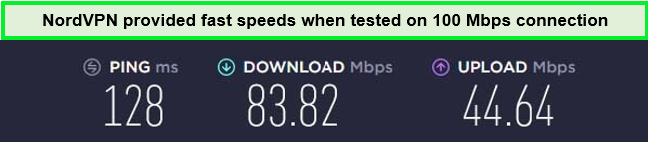
When I conducted a NordVPN speed test in Australia by connecting to its US server, the VPN delivered an impressive download speed of 83.82 Mbps and an upload speed of 44.64 Mbps.
I got the following speeds when tested on the 100 Mbps connection in Australia.
The NordVPN free trial in Australia is great for subscribers. This 7-day trial on Android allows them to thoroughly test its features, reassuring its capabilities before committing to a subscription.
PrivateVPN – Suitable OpenVPN CLI App for Linux in Australia
PrivateVPN is a suitable OpenVPN CLI app for Linux in Australia, as it introduces a command-line application specifically designed for Linux users, compatible with Debian distribution. Renowned for its user-friendly interface, PrivateVPN offers comprehensive setup guides to streamline the installation process, ensuring quick and effortless deployment.
Despite operating a smaller network comprising approximately boasting over 200 servers across 63 countries, providing extensive coverage for users. Moreover, it guarantees fast and unthrottled connections, ideal for uninterrupted streaming experiences.
Its robust encryption protocols, such as IPsec, PPTP, L2TP, OpenVPN (UDP/TCP), and IKEv2, along with DNS leak protection, are used safeguard user anonymity and protect against cyber threats.
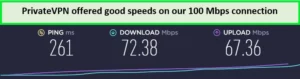
I took a PrivateVPN speed test in Australia on a 100 Mbps connection, and the result was quite impressive. It delivered a download speed of 72.38 Mbps and an upload speed of 67.36 Mbps.
The PrivateVPN speed test performed really well.
With a focus on security, PrivateVPN boasts various impressive features, including military-grade 256-bit AES encryption, DNS leak protection, and a kill switch. Additionally, its strict no-logs policy safeguards user privacy effectively.
The service is available at a very affordable price. Still, if you want to try it out for free, consider opting for the PrivateVPN free trial in Australia.
CyberGhost – User-friendly VPN for Linux in Australia
CyberGhost is a user-friendly VPN for Linux in Australia. The provider offers purpose-specific modes for streaming, torrenting, and online gaming. It also provides various customizable features for the best user-friendly experience for Linux users.
CyberGhost’s Linux command-line app offers the convenience of sorting servers based on their torrenting and streaming capabilities, allowing Australians to optimize their VPN connections for specific purposes. This comprehensive feature set makes CyberGhost an excellent choice for Linux enthusiasts seeking a versatile, user-friendly VPN solution.
The installation of CyberGhost VPN on the Linux operating system was a breeze and completed within a mere 9 minutes. The step-by-step guide on CyberGhost’s website made the entire process incredibly straightforward, and I encountered no obstacles. Following the instructions closely ensured a seamless installation experience, leaving me with a fully functional VPN on the Linux OS.
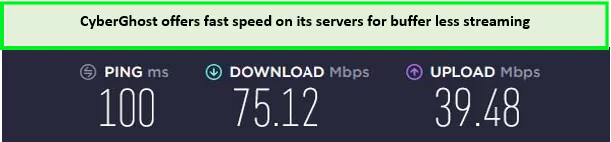
CyberGhost offers11651+ servers in 100+ countries. All of its servers are optimized for high speed. During the CyberGhost speed test in Australia on the local US server, the VPN achieved impressive download speeds of 75.12 Mbps and upload speeds of 39.48 Mbps.
Streaming and gaming without lags were very easy with this VPN in Australia.
If you’re unsure about using this VPN, you can try CyberGhost for free on Linux by taking advantage of its 45-day money-back guarantee. This allows you to use the full version of the VPN service and request a refund if you decide not to continue the subscription.
IPVanish is a suitable VPN for Linux in Australia, offering a comprehensive set of features for an enhanced VPN experience. It provides a dedicated Linux app that ensures a seamless installation and setup process, making it accessible to Australians of all technical levels.
IPVanish has an extensive list of servers, with a network of over 2400 servers available across 135 countries. This wide server coverage enables you to effortlessly access restricted websites and online content without encountering any obstacles.
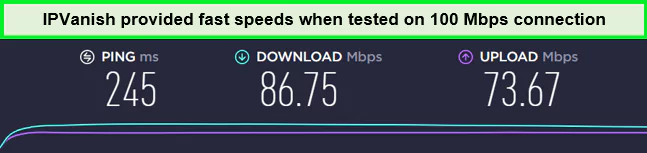
During the IPVanish speed test in Australia, it consistently delivered exceptional results and demonstrated excellent compatibility with streaming services. With a download speed of 86.75 Mbps and an upload speed of 73.67 Mbps on a 100 Mbps connection, IPVanish showcased its ability to handle bandwidth-intensive tasks, such as streaming Ultra HD content, without buffering or interruptions.
IPVanish servers offer maximum speed with limited throttling for a buffer-free experience.
The IPVanish incorporates a variety of cutting-edge security measures to ensure your online safety. These include top-of-the-line AES-256-bit encryption, a kill switch, IP/DNS leak protection, and a zero-logs policy. Furthermore, the app provides additional features such as a SOCKS5 web proxy and Wi-Fi protection to safeguard your internet connections.
You can also use the IPVanish free trial in Australia. This trial, along with a 30-day refund policy, provided a risk-free way to evaluate their offerings on the Android device.
Private Internet Access stands out as a top VPN for torrenting on Linux in Australia due to its dedicated Linux application. Features like SOCKS5 proxy, a strict no-logs policy, and port forwarding make it highly effective for optimized torrenting performance.
You will need to use the terminal to configure the VPN app on Linux. Fortunately, Private Internet Access provides a comprehensive step-by-step guide that proves to be highly helpful during the installation process. Based on my tests, I found that it took approximately 5-6 minutes to successfully install the VPN and establish a connection to one of their servers.
As for servers, PIA offers an enormous network consisting of 35000+ servers in 84 countries. All of its servers are optimized for providing fast speed to users. During the PIA speed test in Australia, it delivered a download speed of 65.78 Mbps and an upload speed of 57.16 Mbps on the 100 Mbps internet connection.
Using these speeds, I could torrent without any lags in–Australia.
The PIA free trial in Australia gives users a firsthand experience of its capabilities without any commitment. After the free trial, it is up to you whether to continue or cancel the VPN subscription.
Testing Methodology: How to Choose the Best VPN for Linux in Australia
The selection process for the best VPN for Linux in Australia is meticulous and detailed. I prioritize various factors to ensure the VPNs I recommend offer Linux users the best compatibility and performance. Here’s the methodology:
Linux Distribution Support: I check for compatibility with a range of Linux distributions.
Linux App Quality and User Experience: I assess the functionality and user-friendliness of the VPN app on Linux.
Support and Documentation for Linux Users: I evaluate the helpfulness of the VPN provider’s resources for Linux users.
Security and Privacy Features: The VPN must offer advanced features like 256-bit encryption and a no-logs policy.
Speed and Performance: Speed tests are conducted to ensure fast and reliable connections.
Streaming Service Unblocking: I test each VPN’s capability to access popular streaming platforms.
Value for Money: I compare subscription costs, features, and money-back guarantee periods.
By testing and evaluating these aspects, I can recommend VPNs that not only provide technical compatibility but also enhance your overall online experience.
Why Do I Need a VPN for Linux in Australia?
You need a VPN for Linux in Australia because it protects your data by encrypting it. This means that even if someone tries to hack into the network, they won’t be able to steal your company’s information. Here’s a list of reasons why you need a VPN for Linux in Australia:
Security: When you browse the web, you might not understand how many traces of your activity you leave behind. A VPN protects your privacy by hiding your IP address and encrypting your data.
Privacy: Your safety increases as your level of anonymity does. Changing your IP address with every online session is one way to avoid becoming a target of doxxing or a denial-of-service attack. You can never be too confident whether the network is secure if you connect to public Wi-Fi hotspots.
To Unblock Websites: Hulu doesn’t accept direct payments from European customers on their website. Access to the site is restricted to users in Australia. The VPN is the answer to all of these issues.
Privacy while Torrenting: VPN can help protect your privacy and maintain anonymity. Routing your torrent traffic through a VPN server makes it difficult to trace your online activity back to your actual IP address. This ensures that your torrenting activities remain private.
Bandwidth throttling: Some Internet service providers limit certain types of traffic. Your ISP may be at fault if online pages load quickly, but file downloads take an eternity. Using a VPN makes it hard to implement traffic-based restrictions.
Torrenting: A VPN is essential for torrenting, shielding your activity from ISP penalties and copyright trolls. Ensure privacy by choosing a VPN provider that doesn’t log your real IP address.
Quick Comparison Table: Best VPNs for Linux in Australia
Here is a quick comparison of the top 7 best Linux VPNs in Australia in 2024:
What Are the Other Ways to Secure Linux in Australia?
In addition to using a VPN, securing your Linux system involves using additional tools to enhance protection against potential threats. Here are some recommended tools for Linux users:
Antivirus software: Install reputable antivirus software designed specifically for Linux. It helps detect and remove malware, viruses, and other malicious software that may attempt to compromise your system.
Anti-rootkit software: Rootkits are malicious programs that grant unauthorized access to a system. Anti-rootkit software scans your Linux system for any hidden rootkits and helps remove them, strengthening overall security.
Regular Software Updates: Keeping your Linux system up to date with the latest software patches and security updates is crucial. These updates often include bug fixes and security enhancements that address known vulnerabilities.
Tripwire: Tripwire is an intrusion detection system that monitors and detects any unauthorized changes to critical system files and directories. It helps identify potential security breaches or tampering attempts, enabling you to take appropriate action.
Firewall: Configure and enable a firewall on your Linux system to control incoming and outgoing network traffic. A firewall acts as a barrier between your system and external networks, allowing you to define rules and filter out potentially malicious connections.
Security-focused browser extensions: Utilize browser extensions that enhance your online security while browsing the web. These extensions can provide features such as blocking malicious websites, preventing tracking, and encrypting your internet traffic.
By implementing these tools, Linux users can strengthen the security of their systems, protect against various threats, and maintain a safer computing environment.
WireGuard and Linux
WireGuard was initially developed for the Linux kernel, but it now works as a cross-platform, which means it can be manually configured or utilized within existing VPN applications.
WireGuard offers competitive security features along with notable speed advantages compared to other protocols like OpenVPN and IKEv2. VPNs that have implemented WireGuard have witnessed substantial speed increases, providing users with a faster and more efficient VPN experience.
Currently, WireGuard is compatible with various Linux distributions, including Debian, Fedora, OpenSUSE, Red Hat, and CentOS, as well as FreeBSD, OpenBSD, and several others. This broad compatibility allows users of different Linux distros to take advantage of WireGuard’s benefits, such as enhanced security and improved connection speeds.
WireGuard’s availability on Linux platforms, combined with its performance advantages, has made it a popular choice among Linux users seeking a reliable and efficient VPN solution.
Comparing OpenVPN vs. WireGuard for Linux in Australia
Linux users looking for a VPN protocol often choose between OpenVPN and WireGuard. WireGuard stands out as the better option for several reasons. It uses newer security technology and has a simpler design, which makes it faster and more reliable than OpenVPN. This is particularly valuable in Australia, where fast and secure internet is important.
Additionally, WireGuard works very well with Linux systems, especially since it’s included in Linux versions from 5.6 onwards, making it easy to set up and use. For those who value speed, ease of use, and modern security, WireGuard is the clear choice over OpenVPN in Australia.
Setting Up a VPN on Your Linux in Australia
As I mentioned earlier, most VPN providers don’t tend to offer GUI-based apps for Linux. However, the command line can seem overwhelming at first. On the other hand, it is fairly easy to use, even if you’re not tech-savvy. Here’s how you can set up a VPN on Linux:
1. Setting Up a Linux PPTP VPN
If you are a coder or have the good old Command-Line Linux working on your system (meaning no network manager), I’m guessing the whole VPN setup process will take you no more than five minutes.
Download the VPN configuration files from your Linux VPN service provider and extract them to the path specified by your VPN service provider. This path may vary based on your Linux VPN service provider’s configuration.
To set up a PPTP VPN on your Linux, start by opening your console/terminal and entering ‘sudo su-‘. The ‘Sudo’ command is meant to bring you to your Linux console’s root environment and log you into it, so the ‘su’ command will help you log into it.
Do not be surprised if the software asks you for your user password when you enter this command. If you beckoned for a password, do not mistake it for your root password.
You might need to make certain edits at this point based on the login credentials provided to you by your VPN service provider.
Once you have completed the edits, use the ‘call server’ command to activate the best Linux VPN tunnel.
When you are done using the Linux VPN, the ‘kill all’ command will allow you to deactivate your Linux VPN tunnel.
2. Setting up OpenVPN on Linux
While setting up a VPN on Linux is easy, it does not provide the same security level as OpenVPN. Therefore, I reviewed some of the industry’s top VPN service providers for their VPN compatibility.
It appears that most of them only provide OpenVPN for Linux users with a graphical Network Manager. This makes setting up OpenVPN much more difficult than it is to set up PPTP.
Follow these steps to set up an OpenVPN connection using Network Manager:
Start by downloading the configuration files from your Linux VPN service provider.
Open the Linux Network Manager” and access the Network Connections settings.” Several tabs should be visible at this point. Click on the tab that says VPN” and click Import.” Do not click Add.”
Choose the Linux VPN server file from the downloaded configuration files (Consult the VPN provider in this regard).
You will find yourself looking at configuration fields to edit your new Linux VPN client connection.
Your VPN service provider will give you the information to enter the fields. Once done with the primary configurations, this includes the configuration you will have to enter in the Advanced” settings.
Apply” the settings and connect via the Network Manager.”
To set up a kill switch in Linux in Australia, you can follow these steps:
Install UFW: You should perform the sudo apt update && sudo apt upgrade commands to update any outdated packages on your system.
Disable IPv6: You can skip this step if you are certain that your internet provider does not support IPv6.
Sign in to the VPN.
Turn on the Kill Switch.
#!/Express VPN bin/bash
# Enable the kill switch by blocking all outgoing traffic
iptables -I OUTPUT ! -o [interface_name] -j DROP
# Disable the kill switch by allowing outgoing traffic again
iptables -D OUTPUT ! -o [interface_name] -j DROP
Replace [interface_name] with the actual name of your network interface.
Save and close the script file.
Make the script executable: In the terminal, navigate to the location where you saved the script file and run the command chmod +x killswitch.sh to make it executable.
Test the kill switch: To enable the kill switch and block all outgoing traffic, run the script with root privileges by executing sudo ./killswitch.sh it in the terminal. To disable the kill switch and allow outgoing traffic again, run the script once more.
By running this script, you can quickly activate or deactivate the kill switch functionality on your Linux system. However, please note that creating and managing a kill switch requires a good understanding of networking and firewall rules. It’s essential to test and verify the functionality before relying on it for your privacy and security needs.
Does Linux OS Distribution Matter When Choosing a VPN?
No, not really. Distributions like Mint and Kali are both Debian-based, so they work similarly. As a result, you can use the same packages since there isn’t much of a difference between them.
On the other hand, if you end up using something like Red Hat-based, you’ll need to use RPM packages. This one is somewhat different from the Debian versions. Based on my experience, if the best Linux VPN provider offers Debian support, it’ll likely support Red Hat as well.
While Linux is widely used, not all VPNs enable Linux settings. Even VPNs that support Linux conceptually might not offer the same level of support for various distributions. Before buying a VPN, read evaluations highlighting its Linux compatibility.
Which Linux Distro is Best for Privacy?
While all Linux distributions differ in their approach to privacy, Ubuntu Privacy Remix (UPR) is recommended as a privacy-focused option. UPR is Debian-based build that encrypts user data on removable media, providing enhanced security against malware infections.
For users seeking complete anonymity, TAILS (The Amnesiac Incognito Live System) is the best Linux distro 2024. Developed by the creators of the Tor network, TAILS is a live OS that can be booted from a USB drive or CD. It routes all internet traffic through Tor, ensuring privacy, and leaving no trace on the host system.
However, it’s important to note that using the best Linux Distro for VPN server alongside these privacy-focused Linux distributions is still crucial for encrypting internet connections and further enhancing online privacy. Most VPN apps recommended earlier should work seamlessly with UPR and TAILS, providing an additional layer of security.
By combining a privacy-focused Linux distribution like UPR or TAILS with a reliable VPN service, users in Australia can significantly enhance their privacy and security while using their computers.
Linux VPNs That You Should Avoid in Australia
Various VPNs support Linux operating systems and claim to be the best Linux VPNs, but that doesn’t mean you should start using them. For example, various free Linux VPN providers generate revenue by selling your personal information. Therefore, the following VPNs should be avoided:
Unlocator — It supports some distros, but it’s not safe to use. It is known to keep identifiable logs of your usage, which means your online activity could be traced back to you. If you still want to use it Linux VPN GitHub is the place to download it.
SecurityKISS — While it claims to be a secure VPN for some distros and OpenSUSE, its privacy policy shows otherwise. I have found that the VPN logs your timestamps and IP address on Linux in Australia, so your anonymity isn’t protected.
CactusVPN — While this VPN offers WireGuard support for Linux, it sadly failed numerous unblocking tests.
USAIP — This VPN offers OpenVPN support for Ubuntu, but customer support wouldn’t share a privacy policy. Also, it doesn’t have its DNS servers, so your ISP can still track your activity.
Can I Use a Free VPN for Linux in Australia?
Yes, you can use a free VPN for Linux in Australia. Many free VPN services offer a viable option for users looking to secure their online activities without incurring any costs. These free VPNs often provide basic features like encryption and anonymous browsing, making them suitable for users with casual privacy needs on their Linux systems in Australia.
However, these free VPNs often have limitations like restricted server locations, slower speeds, and data caps. Some providers may collect and sell user data to offset costs, potentially undermining user privacy. While suitable for basic security, users must weigh these trade-offs before relying on them for comprehensive privacy protection on Linux.
The premier VPN choice for Linux users is ExpressVPN. Alongside ExpressVPN, you can also use other VPNs, such as Surfshark and NordVPN, which also offer robust options worthy of consideration.
Does VPN work with Linux in Australia?
Yes, VPNs work with Linux in Australia. The easiest way is to use the Linux-specific app from your VPN provider, allowing full access to features like fast server switching and protocol options like OpenVPN or WireGuard.
Does Linux have a built-in VPN?
Linuxitself does not come with inherent VPN functionality. For secure and private online activities, Linux users must select a dependable VPN provider. It’s advisable to opt for a paid VPN service that is well-reviewed and offers strong encryption, a wide array of server locations, and high-speed connections.
Is it safe to use a VPN with Linux in Australia?
Yes, using a VPN with Linux in Australia is perfectly safe. VPNs enhance security and privacy by encrypting your internet traffic, protecting your data from threats like hacking and man-in-the-middle attacks. This added security works well with Linux’s inherent strengths, ensuring a safer online experience.
Can a VPN protect against malware on Linux?
A VPN can enhance your online security on Linux by encrypting your internet connection, but it does not directly protect against malware. For comprehensive protection, it’s essential to use antivirus software alongside a VPN. This combination helps safeguard your data from both cyber threats and malicious software.
Why is my Linux VPN not working in Australia?
If your VPN on Linux isn’t functioning properly in Australia, you might encounter a server that has been blocked. VPN servers are frequently placed on blocklists. If you encounter this situation, attempt selecting an alternate server. If this approach proves ineffective, reach out to customer support for assistance in resolving the issue.
Can I make my own VPN on Linux in Australia?
Yes, you can create a VPN on Linux in Australia using protocols like OpenVPN or WireGuard, or cloud services like AWS or DigitalOcean with tools like SoftEther VPN. However, DIY VPNs can be complex and may offer fewer server options compared to ready-made solutions, with third-party cloud providers handling data transmission.
How do I set up a L2TP VPN connection in Linux?
To establish an L2TP VPN connection on Linux, start by creating a VPN connection via Settings > Network > VPN” and select L2TP. You’ll need to input the necessary details, such as the firewall’s public IP, account name, and password. Additionally, set up the Pre-shared key and specify “3des-sha1-modp1024” for Phase 1 and “3des-sha1” for Phase 2.
Which VPN protocol is best on Linux?
The best VPN protocol for Linux depends on your needs for security, speed, and compatibility. Common options include IPsec, PPTP, L2TP, UDP, TCP, and TLS, each offering different benefits in encryption, speed, and reliability.
Wrapping Up!
Linux stands out for its security and open-source nature, appealing to those who value privacy and control over their digital environment. However, even with Linux’s robust security features, users face online threats like surveillance and data breaches. A VPN addresses these concerns by encrypting data and concealing the user’s IP address, enhancing privacy and security for Linux users.
The best VPN for Linux in Australia enhances online safety by encrypting internet traffic and masking the user’s real location. This encryption makes data unreadable to unauthorized parties, while the anonymity feature allows access to geo-restricted content.


















![The Best VPN for ViuTV in Australia – [Updated 2025]](../../../wp-content/uploads/2022/07/Best-VPN-for-VIUTV-300x169.jpg)

![Best VPN for Optus Sport Outside Australia – [Updated 2026]](../../../wp-content/uploads/2023/02/best-vpn-for-Optus-Sport-AU-300x169.jpg)
![The Best VPN for Vudu in Australia [Fast for Streaming]](../../../wp-content/uploads/2022/09/Best-VPN-for-Vudu-1-300x169.jpg)