$4.99/mo - Save 61% With Exclusive 2-Year Plan + 4 Months Free!Claim Now
Best Mac VPN in USA [6 Secure & Fast Picks For 2025]
Last updatedSeptember 25, 2025
Muhammad Maaz
Senior Writer
Muhammad Maaz specializes in crafting insightful content on cybersecurity, unbiased VPN reviews trough extensive tests, and online privacy topics. Along with writing for the cybersecurity niche, he is passionate about sports, gaming, and staying updated on cyber trends. His interests and passion turn complex topics into engaging, practical, and informative pieces.
Muhammad Maaz specializes in crafting insightful content on cybersecurity, unbiased VPN reviews trough extensive tests, and online privacy topics. Along with writing for the cybersecurity niche, he is passionate about sports, gaming, and staying updated on cyber trends. His interests and passion turn complex topics into engaging, practical, and informative pieces.
When it comes to securing your Mac, a reliable VPN is crucial. While macOS offers some built-in protection, it’s not immune to online threats. The best Mac VPN ensures that your browsing, streaming, and personal data are safe from hackers and surveillance, providing you with an extra layer of privacy.
As a Mac user, I’ve tested numerous VPNs for macOS, focusing on security, ease of use, and performance. In this guide, I’ll share the top VPNs for Mac based on my hands-on experience and rigorous testing. Whether you want to access geo-restricted content or simply protect your online activity, these VPNs deliver the best balance of privacy, speed, and value.
Quick Overview: Best Mac VPN in USA
I have tested 150+ VPNs using various Mac devices and OSes to find out the best VPN for Mac USA. Check out the below overview of the best Mac VPNs for 2025:
Known for its exceptional speed and robust security features, ExpressVPN stands out as the best Overall VPN for Mac in USA. It offers seamless Mac integration and exceptional unblocking capability for streaming services worldwide.
Surfshark stands out for its affordability without compromising on features. It offers unlimited device connections and strong privacy protections for Mac in USA with CleanWeb and MultiHop features.
With its vast server network and Nordlynx protocol, NordVPN is perfect for a fast and secure online experience. Plus, it offers exclusive macOS presets for one-click configuration of apps and websites, making it even more convenient than the PC versions.
IPVanish stands out as the epitome of reliability among Mac VPNs in USA. With dependable speed and security, all supported by a 30-day money-back guarantee, it allows unlimited connections across Apple devices on a single subscription.
CyberGhost is celebrated for its user-friendly interface, ideal for those looking for the easiest Mac VPN to use in USA. It provides intuitive MacOS apps and servers optimized specifically for streaming and torrenting on Mac devices.
A VPN on your Mac offers several significant advantages. It not only enhances your security but also improves your browsing experience. Let’s take a look at the key benefits that a reliable VPN can bring to your Mac, such as better privacy, enhanced protection on public Wi-Fi, and bypassing geo-restrictions.
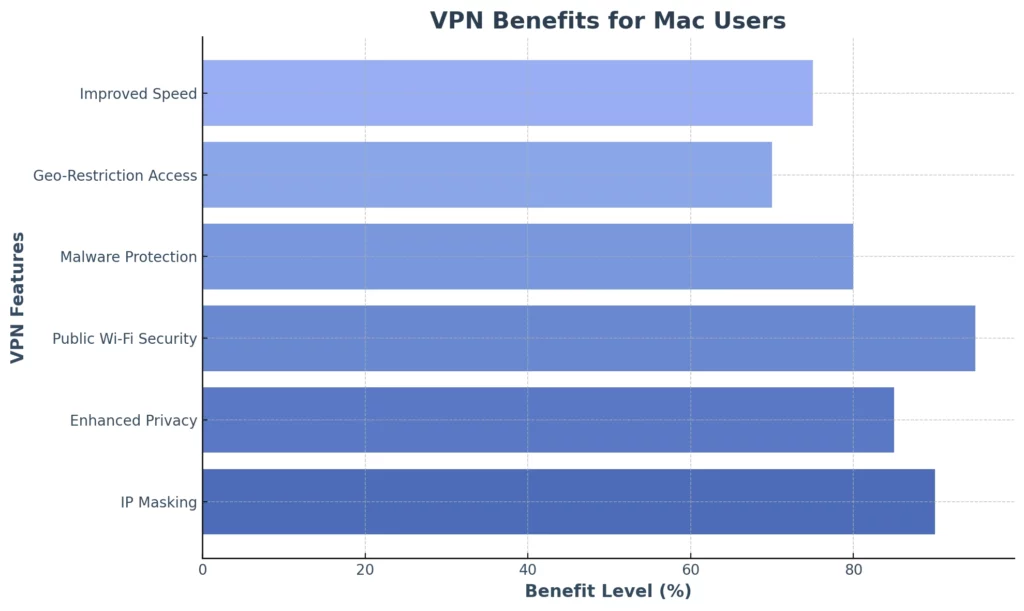
In the visual below, you’ll see a detailed breakdown of how a VPN enhances different aspects of Mac usage. From ensuring anonymity to increasing internet speed, the benefits of using a VPN on your Mac are clear.
By using a VPN, you can mask your IP address, ensuring you stay anonymous and secure while browsing. The infographic illustrates how various features like malware protection, geo-restriction bypass, and enhanced privacy contribute to your overall security.
This graphical representation should give you a clear overview of why a VPN is an essential tool for Mac users. The numbers speak for themselves: a VPN increases your privacy and online security, making it an indispensable tool for anyone serious about protecting their data online.
6 Best VPNs for Mac in USA for 2025 – Detailed Analysis
Having tested various VPNs and reviewed 1.3 million users’ experiences to find out what is the best VPN to use on a Mac in USA, I’ve identified my top choice for Mac users seeking to safeguard their privacy.
Explore my in-depth reviews of the best Mac VPN in USA and make an informed choice, ensuring you stay connected and protected.
Easy installation process; no issues faced when installing on macOS Catalina.
Streaming Support
Seamlessly unblocks US Netflix, offering an exceptional streaming experience with high speeds and no buffering.
Speed Performance
Download Speed: 89.42 Mbps; Upload Speed: 84.64 Mbps on a 100 Mbps connection, with less than a 7% drop in speed, ideal for 4K streaming.
Global Server Coverage
Over 105 countries, ensuring reliable global connections.
Streaming Features
Supports the MediaStreamer feature, enhancing streaming capabilities by unblocking geo-restricted content.
Security Features
AES-256 Encryption, Split Tunneling, TrustedServer Technology, Kill Switch, and a strict no-logging policy to ensure user privacy and data protection.
VPN Protocol
OpenVPN protocol for secure internet data encryption.
Customer Support
Excellent customer support, available via live chat or email, ensuring quick and knowledgeable assistance.
User Interface
Intuitive and user-friendly interface for Mac, making it easy to connect, switch servers, and adjust settings.
Overall Assessment
ExpressVPN stands out as the best VPN for Mac users due to its fast speeds, strong security features, ease of use, and excellent streaming capabilities. It is ideal for Netflix access and provides exceptional customer support.
If you want to learn more about ExpressVPN, be sure to read my comprehensive ExpressVPN review.
Easy to install on Mac with a simple and straightforward setup process.
Streaming Support
Unblocks Netflix content worldwide, offering access to over 20 Netflix libraries with buffer-less streaming.
Speed Performance
Download Speed: 93.42 Mbps; Upload Speed: 87.68 Mbps on a 100 Mbps connection, ideal for HD and 4K streaming.
Global Server Coverage
Over 61 countries with 6000 servers, ensuring global access and fast connections.
Streaming Features
Supports access to geo-restricted content with no buffering, ideal for streaming on Mac devices.
Security Features
AES-256 Encryption, DoubleVPN, OpenVPN, NordLynx, and IKEv2 protocols, ensuring strong protection for online activities.
VPN Protocol
Supports OpenVPN, NordLynx, IKEv2, and L2TP protocols for secure and fast connections on Mac.
Customer Support
Responsive customer support available through live chat for assistance with Mac setup and troubleshooting.
User Interface
User-friendly interface on macOS, making it easy to switch servers, adjust settings, and manage your VPN connection.
Overall Assessment
NordVPN offers lightning-fast speeds, robust security, seamless streaming capabilities, and excellent compatibility for Mac users, making it the top choice.
If you’d like to read more about this VPN for Mac in USA, you can go through my NordVPN review.
Easy installation process on macOS with no issues during setup on MacBook and iMac devices.
Streaming Support
Unblocks streaming platforms such as Netflix and other geo-restricted services with fast and stable speeds.
Speed Performance
Download Speed: 75.47 Mbps; Upload Speed: 69.34 Mbps on a 100 Mbps connection, ideal for streaming and torrenting.
Global Server Coverage
Over 100 countries with 11651 servers, including specialized servers for streaming, torrenting, and gaming.
Streaming Features
Offers servers specifically optimized for streaming and torrenting with smooth, uninterrupted access.
Security Features
AES 256-bit Encryption, Ad-Blocker, and a strict No-Logs policy, ensuring complete privacy and security on Mac.
VPN Protocol
Supports multiple secure protocols for reliable and fast connections on macOS.
Customer Support
24/7 live chat support for quick assistance and troubleshooting, ensuring smooth usage of CyberGhost on Mac.
User Interface
Intuitive and easy-to-navigate interface designed specifically for Mac users to easily manage and adjust settings.
Overall Assessment
CyberGhost is an excellent VPN for Mac users, providing reliable streaming, robust security, and excellent customer support with an intuitive interface.
If you’d like to read more about this VPN, you can go through my CyberGhost VPN review.
Choosing the best Mac VPN in USA requires weighing several factors to find the service that fits your specific needs and online habits. Check out my criteria for how to choose the best VPN for Mac in USA as I guide you through these considerations:
Privacy Policy: Select a VPN with a transparent privacy policy that doesn’t sell user data. Avoid free services that might compromise privacy.
Provider Location: The location of the VPN provider matters; choose one based in privacy-friendly countries that don’t require data logs.
Server Availability: Opt for a VPN with a global server network to avoid overcrowded servers and access region-locked content seamlessly.
Payment Options: Look for providers offering various payment methods like PayPal, Bitcoin, or the Mac App Store to ensure secure transactions.
User Interface: Choose a user-friendly Mac client for easy setup and management, preferably with a lightweight design.
Device Protection: Ensure the VPN supports multiple devices, protecting your entire household’s devices with a single subscription.
How to Set Up a VPN on Mac in USA?
You can set up the best VPN software for Mac by simply following my easy-to-follow tutorial guide:
Subscribe to a premium VPN from the App Store. My best recommendation is ExpressVPN.
Install the VPN App on your Mac device.
Connect to any server in your desired country.
Change the location of your Apple ID in the settings, and disable GPS monitoring.
Manual VPN Configuration Guide for Mac Users in USA
Configuring a VPN manually on your Mac in USA involves inputting specific details and settings. For those who prefer to have complete control over their privacy settings, the following steps outline the process:
Access Network Preferences: Open System Preferences” and navigate to Network.”
Add VPN Connection: Click the +” button to create a new network interface.
Select VPN Type: Choose the desired VPN type, such as L2TP over IPSec.
Configure Connection Details: Enter the server address, account name, and other necessary settings.
Advanced Options: Click the Advanced” button to access advanced settings, including Encryption and authentication options.
Authentication Settings: Input your authentication details, including the shared secret and user authentication.
Apply and Connect: Save the settings and click Connect” to establish the VPN connection.
Choosing the Best VPN for Mac in USA: What Reddit Users Suggest?
In a recent Reddit thread, users discussed the key criteria for selecting a VPN suitable for Mac users. They emphasized factors like safety, speed, and user-friendliness. Several popular VPN providers were mentioned, including Private Internet Access, NordVPN, Surfshark, CyberGhost, ProtonVPN, Mullvad, Windscribe, Hotspot Shield, and ExpressVPN.
However, opinions varied regarding the superiority of each option. Some users cautioned against certain VPN services, particularly Private Internet Access and NordVPN. Based on my comprehensive testing, ExpressVPN is the top choice for Mac users in USA. Offering exceptional features, fast connection speeds, and dependable customer support.
Why is My VPN Not Working on Mac in USA?
If you’re experiencing issues with your VPN Macbook Pro in USA, I listed various troubleshooting approaches you can try:
Restart macOS: If your VPN connection fails on macOS, restarting the system is an easy troubleshooting option. Many VPN issues can be repaired simply by restarting your Mac. To do so, go to the Apple menu and choose Restart.”
Upgrade VPN Service: Make sure your VPN client is up to date. Regular upgrades ensure that the VPN service works properly. If your VPN client does not deliver regular updates, you might consider transferring to a new VPN macOS service such as ExpressVPN.
Restart your VPN: If restarting and updating your VPN client Mac does not resolve the connectivity issues on macOS, consider reinstalling the VPN client.
Restart your home router: Power off it for about 10 seconds, then turn it back on. This can resolve connectivity issues between your Macbook VPN and the router, often improving VPN performance.
Recreate the VPN connection: Delete and recreate the VPN configuration with accurate settings, ensuring no errors or inconsistencies are causing the connection problem.
Explore different browsers: Try accessing the VPN through various browsers; some browsers might have compatibility or cache-related issues affecting VPN functionality.
Clear the macOS DNS cache: Flush the DNS cache on your Mac to resolve domain name resolution issues impacting the VPN’s ability to connect.
Consider using a mobile data connection: Temporarily switch to a mobile data connection (if available) to verify whether the issue is related to your home network. This will help you identify whether the VPN works over a different network.
Check for IP Address Leak: If accessing streaming sites is an issue, search What’s my IP address” on Google. If your actual IP is displayed, your VPN might be leaking data.
Mac VPN Services to Avoid in USA
When considering what is the best VPN to use in USA, knowing which services might compromise online privacy and security is critical. Prioritizing online anonymity, I recommend avoiding the following VPNs:
Hola VPN
Hola VPN is unsuitable for Mac users as it lacks Encryption and a Kill Switch. It also has a controversial history of selling its bandwidth to those intending to carry out a denial-of-service attack. For more information, refer to my detailed review of Hola VPN outside USA.
HideMyAss
HideMyAss’s history of logging user data is concerning, particularly in USA – a country with strict data retention laws. Although they have updated their logging policies to increase user privacy, this background can make users wary, especially if absolute privacy is a priority. For more information, refer to my detailed review of HideMyAss outside USA.
Hoxx VPN
It is another VPN provider that Mac users should avoid. It tracks and logs detailed user information, including your browser type, IP address, and the web pages you visit, which can compromise your privacy. For more information, you can read my detailed Hoxx VPN review outside USA.
More Guides At VPNRanks
Check out these operating systems and device guides to streamline your online experience:
Best VPN for Safari: Discover VPNs that allow Safari extensions on your Mac devices.
Best iPhone VPN: Bring security and online freedom to your hand-held iOS gadget.
These VPNs offer the best performance, security, and features tailored for Mac users.
What is the fastest VPN in USA for Mac?
NordVPN is the fastest VPN for Mac, especially notable for its extensive server network, including speedy servers in USA. With NordLynx protocol, NordVPN ensures faster speeds, secure access to local content, and enhanced data privacy and security for Mac users.
Is NordVPN legal in USA?
Yes, using NordVPNin USA is perfectly legal. While some countries with strict internet censorship laws ban VPN services, USA allows VPNs to enhance online privacy and security.
Does Mac have a built-in VPN?
No! Macs do not have a built-in VPN; however, they support VPN connections, allowing you to connect to a school or company’s private network if you have the necessary credentials. You can download and install a reputable app like ExpressVPN to get a VPN on your Mac.
Is VPN a good idea for Mac in USA?
Yes, it is – as implementing a VPN on Mac in USA enhances your internet security through multiple channels. Without a virtual private network on your Mac, your details are vulnerable. Websites and applications can access and view your data, obtaining your IP address and other personal identifiers.
Is it safe to install VPN on Mac in USA?
Yes, it is safe to install a VPN on a Mac. Many Apple users enhance their device and data security with additional layers of protection. A Virtual Private Network (VPN) provides a private and secure way to connect to the internet, encrypting your data and masking your IP address to safeguard your online activities.
What is the best Mac VPN for USA for gaming?
The best Mac VPN for gaming in USA is ExpressVPN. It boasts an extensive network of server locations, offering blazing-fast speeds that are ideal for gaming without lag. Additionally, ExpressVPN provides superb privacy protections to keep your online activities secure while gaming.
Conclusion
Even though MacOS comes with many built-in security features, some vulnerabilities remain untreated. With cyber threats looming and regional content restrictions denying access to your favorite shows, it’s crystal clear that the best Mac VPN in USA is a must-have tool.
Various elements should be considered when looking for a VPN, including security features, user-friendly interfaces, and server networks. ExpressVPN is my top choice for Mac, offering the best unblocking ability and macOS compatibility. It ensures both privacy and seamless browsing experiences on your Mac.
Dear Steven,
Thanks for reaching out to us. You can try out the above mentioned procedures and avail different protocols like PPTP, SSTP, IPsec and others on your Mac devices.
Cheers!!!





![Best Chrome VPN Extensions [Updated in 2025]](../../wp-content/uploads/2024/03/Best-Chrome-VPN-Extensions-300x131.png)



Recent Comments 2
Do these procedures work for Open Vpn Mac only? I need other than OpenVPN. Update me if that is so. Thanks
Dear Steven,
Thanks for reaching out to us. You can try out the above mentioned procedures and avail different protocols like PPTP, SSTP, IPsec and others on your Mac devices.
Cheers!!!
Comments are closed.