
My ExpressVPN review highlights its exceptional usability, privacy, and transparency, making it a standout choice for secure online activities. Its advanced Lightway tunnelling protocol ensures stellar browsing speeds, making gaming, torrenting, and streaming seamless.
Furthermore, in my in-depth ExpressVPN review, I found it effectively blocks malware and phishing attempts, providing added protection against high-stakes issues like DNS leaks. Whether accessing online services or safeguarding your privacy, ExpressVPN offers a comprehensive solution that excels in every aspect.
| Features | Rating by Editor |
|---|---|
| Transparency | ★★★★★ |
| Browsing Speed | ★★★★★ |
| Malware and Phishing Protection | ★★★★☆ |
| Lightway Tunneling Protocol | ★★★★★ |
| Gaming Performance | ★★★★☆ |
| Torrenting Capabilities | ★★★★☆ |
| DNS Leak Prevention | ★★★★★ |
| Online Service Compatibility | ★★★★★ |
| ExpressVPN Price | $4.99/mo - Save 61% With Exclusive 2-Year Plan + 4 Months Free |
Pros
- Extremely user-friendly
- Fast connections
- A broad range of server locations
- Strong privacy and security practices
- Sleek, stylish interface
- Offers an Advanced Protection suite
Cons
- MultiHop connections not supported
- The DNS leak protection feature doesn’t work properly on a few devices
- Offers only 8 simultaneous connections
💡Try ExpressVPN yourself with their 30-day risk-free trial and decide if it’s the right VPN for your needs. Additionally, you can read my in-depth analysis 📖 of each ExpressVPN feature.
ExpressVPN Review: A Closer Look at Its Performance
ExpressVPN delivers speeds with less than a 10% drop, outperforming competitors like NordVPN and Surfshark, which see 15-20% declines when I compare ExpressVPN with either top VPN. Its 98% compatibility with Netflix and Hulu ensures seamless streaming. MediaStreamer adds flexibility for gaming consoles and smart TVs.
Additionally, it outshines competitors with 18 independent audits, setting a benchmark for transparency. Its RAM-only TrustedServer technology ensures no data retention, unlike others. With thousands of servers, it offers reliable global coverage and security.
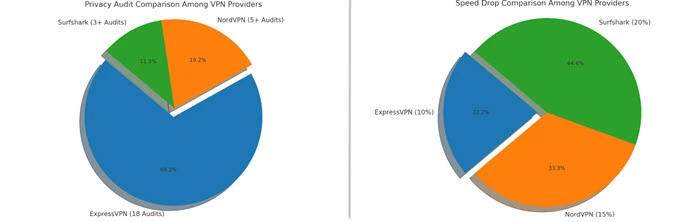
🎯Editor’s Verdict: Using a detailed methodology, ExpressVPN emerges as a top contender with unmatched speed, privacy, and streaming performance. Its robust features and transparent practices set a high benchmark among VPN providers.
In-Depth ExpressVPN Review
ExpressVPN combines advanced encryption, blazing-fast speeds, and seamless unblocking capabilities, setting a benchmark in the VPN industry. This review highlights its protocols, server network, and privacy features to reveal its true potential.
ExpressVPN Pricing and Plans: How Much Does ExpressVPN Cost?
ExpressVPN may cost more than some other VPNs, but its quality makes it worth considering. It offers flexible subscription options, including monthly and yearly plans, allowing you to choose the one that fits your needs while enjoying excellent performance and security.
Get $4.99/mo - Save 61% With Exclusive 2-Year Plan + 4 Months Free on ExpressVPN’s premium security and performance.
Although it is more expensive than many other VPNs, the advanced security features, large server network, and user-friendly apps make ExpressVPN a strong choice for those seeking top-notch quality.
Paying for ExpressVPN cost is straightforward, with options like credit cards, PayPal, Bitcoin, and Mint Prepaid for extra privacy.
Ultimate Value for U.S. Customers with ExpressVPN’s 2-Year Plan
ExpressVPN’s Identity Defender suite offers an unparalleled package for new U.S. customers subscribing to its 2-year plan. Users gain two years of premium VPN protection along with ID Alerts, $1M ID Theft Insurance, and Data Removal services—all bundled at no additional cost.
With its robust monitoring tools for dark web activity, social security alerts, and address changes, as well as cyber insurance powered by Assurant to cover any potential identity theft and aid in account restoration.
Additionally, the Data Removal service identifies data brokers and people search sites holding personal information, helping users opt-out and ensuring ongoing monitoring to keep data safe. This 2-year plan, representing ExpressVPN’s best value yet, delivers extensive security and privacy tools in one seamless app, available at the most competitive price in its 15-year history.
How Does ExpressVPN’s Pricing Compare to Competitors?
Pricing is a significant factor for many users when choosing a VPN service. Below is a comparison of prices and features among top VPNs:
| VPN Service | VPN Deals | Features |
|---|---|---|
| ExpressVPN | $4.99/mo - Save 61% With Exclusive 2-Year Plan + 4 Months Free | Fast speeds, strong encryption, 3,000+ servers |
| NordVPN | $3.39/mo - Save up to 70% off on 2-year plan + 30-day money-back guarantee | Double VPN, huge servers, CyberSec |
| Surfshark | $2.49/mo - Save up to 77% with exclusive 2-year plan + 30-day money-back guarantee | Unlimited devices, CleanWeb, extended servers |
| IPVanish | $2.19/mo - Save 83% on 2-Year Plan with a 30-day money-back guarantee | Unlimited devices, large servers |
Despite being more expensive, ExpressVPN offers comprehensive features and strong security, justifying its higher price.
Can I Use ExpressVPN for Free?
The only way to use ExpressVPN for free beyond seven days is by using its 30-day risk-free money-back guarantee. This refund option is available if you subscribe on PC, Mac, Android, Fire TV Stick, and Apple TV. However, there is no money-back guarantee for subscriptions through iOS.
Save Big with ExpressVPN Coupons for Exclusive Discounts:
Looking to protect your online privacy while saving money? Take advantage of ExpressVPN coupons in USA to enjoy significant discounts on one of the most trusted VPN services available. Keep your data secure at a fraction of the cost!
Speed: How Fast is ExpressVPN?
In my ExpressVPN speed review, I noticed a speed reduction, mainly due to slow OpenVPN speeds on Windows, which dropped by about 20%. ExpressVPN offers both the OpenVPN protocol for security and the newer, faster Lightway protocol.
OpenVPN had some speed issues, but ExpressVPN focuses on improving Lightway, which most users prefer. Lightway showed much less speed loss and performed more efficiently, especially on newer devices.
ExpressVPN’s performance stayed stable across tests, even with the OpenVPN issues. Local servers reduced download speeds by about 12-15%, and long-distance servers experienced around a 20% speed loss, which is still better than many other VPNs. For more details, check out ExpressVPN’s full-speed analysis on both local and long-distance servers.
Does ExpressVPN Slow Down Internet Speed Significantly?
Speed is a critical factor for VPN users, and this query addresses a common concern. Generally, ExpressVPN maintains high speeds, with average Express VPN download speeds around 89.42 Mbps. Here’s a comparison of speeds across different servers:
| Server Location | Download Speed (Mbps) | Upload Speed (Mbps) | Latency (ms) |
|---|---|---|---|
| USA | 89.42 | 45.20 | 35 |
| UK | 88.15 | 44.80 | 40 |
| Canada | 87.90 | 44.50 | 38 |
| Australia | 86.50 | 43.30 | 50 |
| Germany | 87.00 | 44.00 | 42 |
How Fast Is ExpressVPN Compared to Other VPNs?
Speed comparisons help users make informed decisions based on performance. Below is a graph comparing ExpressVPN with other top VPNs.
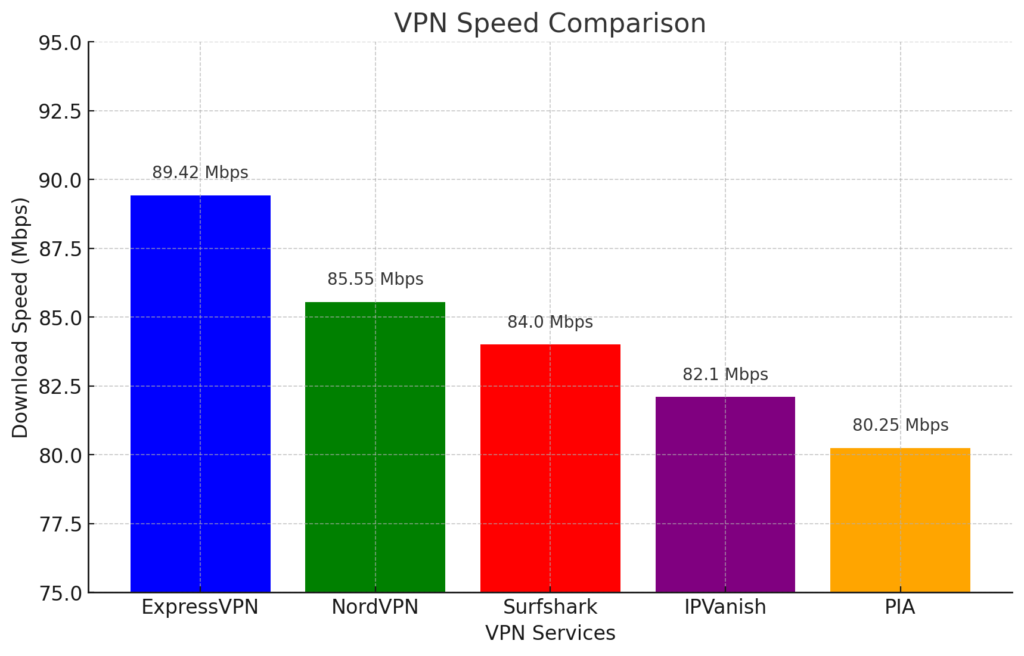
The graph shows that ExpressVPN offers the fastest download speeds among the top VPNs, including NordVPN, Surfshark, IPVanish, and PIA. This makes ExpressVPN a top choice for users who prioritize speed.
ExpressVPN Security Features: Is ExpressVPN Safe?
ExpressVPN works hard to keep your online activity safe, especially when you use public Wi-Fi. It uses strong security tools to protect your data, like an Advanced Protection suite that blocks trackers, harmful websites, and ads.
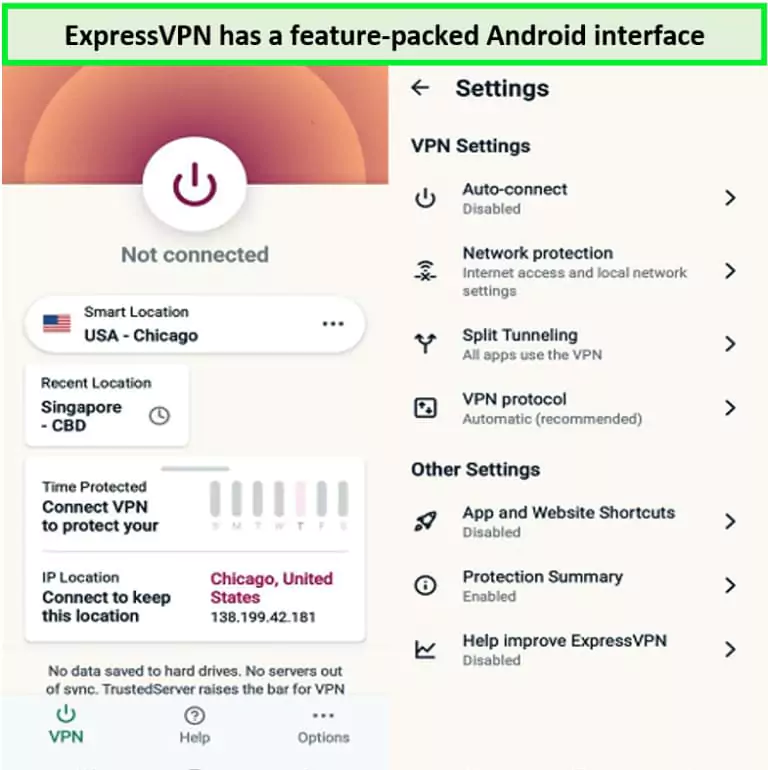
The app also has split tunneling and a privacy checklist for Android users. It includes a password manager called Keys, which is free for both Android and iOS. Keys has received good reviews for being secure and easy to use.
To show its commitment to privacy, ExpressVPN shares transparency reports twice a year, explaining how many legal requests it gets and how it handles them. The company’s privacy policy makes it clear that they do not log your online activity, browsing history, data, DNS queries, IP address, or connection times.
All personal information related to your account is handled by ExpressVPN and its partners to keep your data safe and private.
Secure Connections Via Tunnelling
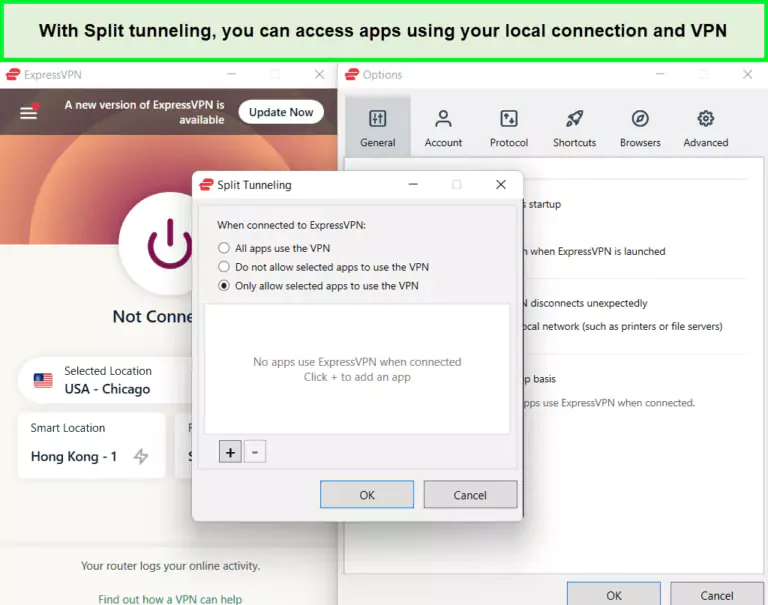
Split tunneling with ExpressVPN allows you to send data privately while exempting some traffic from the VPN tunnel. This is useful if you want to enjoy streaming with an international connection and access your banking site with a local IP. First, you must decide which app will use the VPN connection.
Please disconnect from your VPN connection to add/exclude websites and apps
You’ll find three options under the settings of split tunnelling:
- All apps use the VPN
- Do not allow selected apps to use the VPN
- Only allow selected apps to use the VPN
In my ExpressVPN review for testing, I chose the 3rd option and added a Netflix app to test the feature. Then, I connected to ExpressVPN’s USA – New Jersey – 3 server and accessed the streaming platform’s app. It worked great, and I could normally stream the exclusive US content while using my local IP for everything else.
This feature is only available on the Mac, Windows, and router apps for ExpressVPN. Sadly, you don’t get split tunnelling on mobile apps.
Data Encryption — Military-Grade Protection
ExpressVPN utilizes the industry-standard AES 256-bit encryption, matching the security levels of top VPNs like Surfshark and NordVPN. On the 256-bit keyspace, your data is uncrackable. Please note that this is the same encryption level that banks, governments, and militaries use to secure sensitive data.
AES 256-bit means 1.1 x 10^77 or 2^256 possible combinations. The number of bits tells you the potential number of combinations there are to make the key.
Moreover, ExpressVPN uses the SHA-512 HMAC authentication, which is super-secure for transferring all kinds of data, including torrent files. With a shared key, both the sender and receiver can determine the identity of the file. In case of any changes in the secret key, you’ll know that the file has been tampered with, so the breach would quickly be identified and dealt with.
It uses perfect forward secrecy, which changes the encryption key every time you log into ExpressVPN. So, even if someone decrypts your key, your past and future sessions will not be decrypted.
What Encryption Protocols Does ExpressVPN Use?
ExpressVPN uses advanced encryption protocols to ensure user security. Understanding these protocols is vital for evaluating the security of a VPN.
- OpenVPN
- Lightway
- IKEv2
- L2TP/IPsec
Security Protocols
Wondering, Is ExpressVPN risky? ExpressVPN offers different protocols, allowing you to customize the VPN for any situation. Security protocols are rules that a VPN uses to inform how to encrypt your data.
ExpressVPN’s Lightway protocol recently upgraded to DTLS 1.3, significantly enhancing its encryption capabilities. This update improves protection against security threats like eavesdropping and man-in-the-middle attacks, where sensitive data like passwords or financial information can be intercepted.
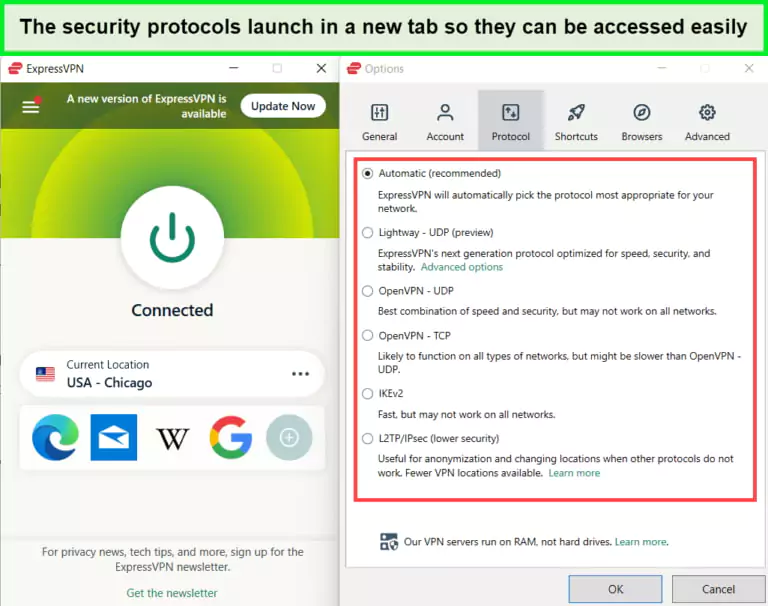
You can find the ExpressVPN protocols tab under Settings
Please note that every protocol is a bit different than the other. Let’s check all of them below:
- Lightway: This protocol is exclusive to ExpressVPN. It seamlessly transitions between networks and doesn’t drain too much battery, making it an excellent choice for mobile phones. It offers two options: Lightway UDP and TCP. Per the ExpressVPN Lightway review testing, the TCP is 10% faster than UDP and is a better option for unreliable networks.
- IKEv2: This was only 2% faster than OpenVPN, per the tests. The protocol isn’t too secure and can easily be blocked by firewalls, so you should only use it if the rest aren’t working. Moreover, it has no TCP option.
- OpenVPN: This open-source protocol is one of the most secure options. It has TCP and UDP options but comes out faster than TCP.
- L2TP/IPsec: This is the oldest and the least secure option. However, it turned out to be the fastest in the tests and can be used if you prioritize speed over security.
You can switch to different protocols using the Mac, iOS, Windows, and Android tabs. On the other hand, on Linux, you can use various commands in the terminal. Moreover, you get a different set of protocols based on your device:
| ExpressVPN Protocols | Android | Windows | Mac | iOS | Routers | Linux |
|---|---|---|---|---|---|---|
| OpenVPN | ✅ | ✅ | ✅ | ✅ | ✅ | ✅ |
| Lightway | ✅ | ✅ | ✅ | ✅ | ✅ | ✅ |
| IKEv2 | ❌ | ✅ | ✅ | ✅ | ❌ | ❌ |
| L2TP/IPsec | ❌ | ✅ | ✅ | ❌ | ✅ | ❌ |
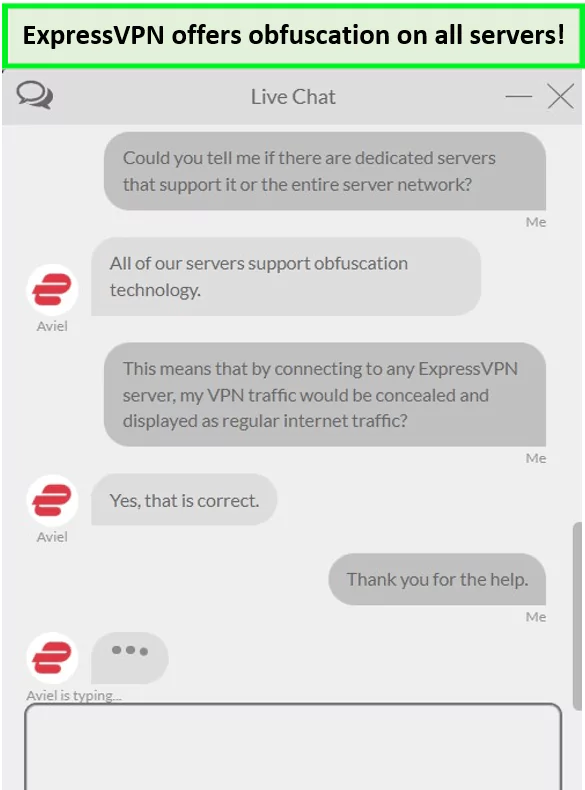
You can also use the Automatic selection option to choose the best protocol based on your connection. My Express VPN review found that not every server supports the L2TP/IPsec protocol. Furthermore, I appreciate that the Lightway protocol automatically includes obfuscation, eliminating the need to connect to separate obfuscated servers to hide VPN usage when using Lightway.
ExpressVPN Kill Switch Feature
ExpressVPN kill switch (also called Network Lock) is available on the app for Windows, macOS, Linux, Android, and routers. It keeps your activities safe if your VPN connection drops unexpectedly. This kill switch mechanism ensures that not even a single packet of your data slips through the internet from your computer without Express VPN guarding it.
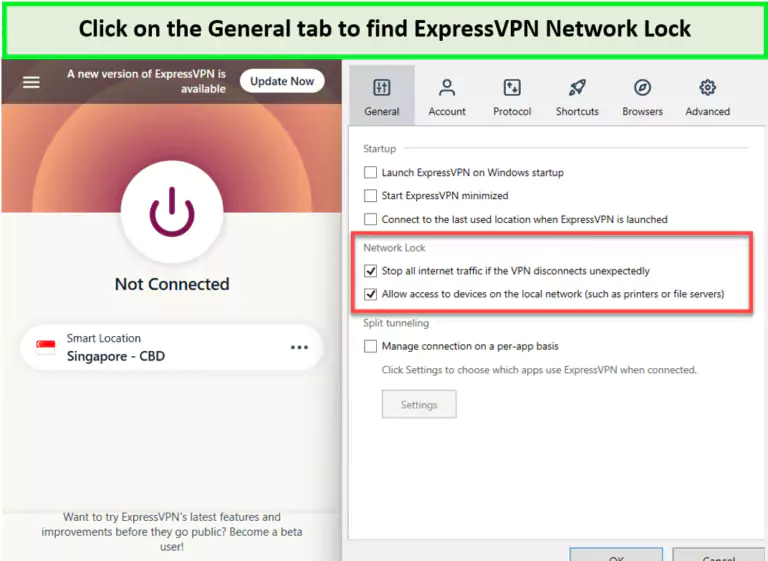
Enable the ExpressVPN Network Lock and secure your activities from leaking
To evaluate the kill switch for the ExpressVPN review, I connected to ExpressVPN’s AU – Brisbane server and switched my internet off to see the results. I kept the ExpressVPN app open on a screen while doing so, and this is the error I immediately received:
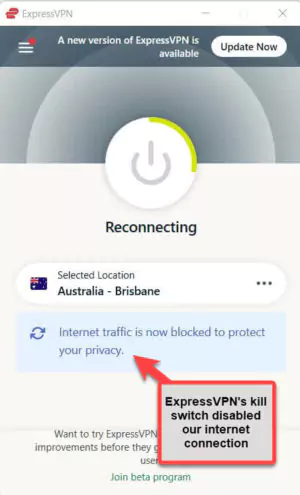
Testing of ExpressVPN’s kill switch was a success!
Once this error was displayed on my screen, I could not access any site until I connected to the Wi-Fi network again. In short, ExpressVPN worked flawlessly without any issues and responded swiftly to my attempts.
You can enable and disable the kill switch on the Windows and Android apps using its toggle as your preference. The same function isn’t offered on the router app, though.
Additionally, the feature is known as Network Protection on Android devices, and you require setting the feature to ‘Always On’ in the settings to make the most of it. Not to mention, ExpressVPN’s kill switch is automatic on Mac, iOS, and Linux.
ExpressVPN’s DNS Leak Protection
Regarding the DNS leak, Is Express VPN 100% safe? As per my experience, I discovered a DNS leak issue in the Windows app while using the split tunnelling feature, exposing my DNS requests to my ISP. This privacy flaw was significant, especially for users in strict surveillance regions.
After reporting the bug, ExpressVPN responded promptly, temporarily disabling the split tunnelling feature and working quickly to patch the issue. They also communicated openly about the problem in a blog post and successfully fixed it, restoring the feature without further DNS leaks in subsequent tests.
Once fixed, I ran ExpressVPN through browserleaks.com to check whether it leaked the WebRTC information. Since I was connected to the Canadian server of ExpressVPN for the test, the results below showed IP addresses associated with ExpressVPN’s servers, evidence that I did not encounter WebRTC leaks at all with this VPN.
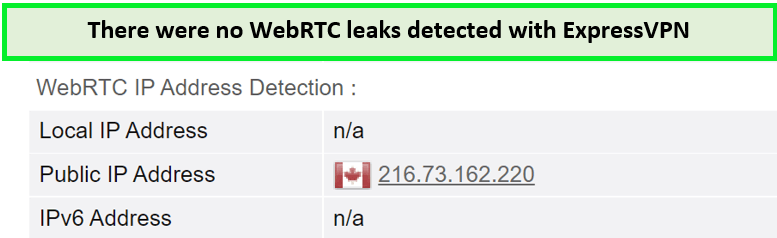
ExpressVPN dedicated IP remains consistent in testing as well
Even if a VPN keeps you secure, leaks can still occur. That’s why it’s great to use ExpressVPN since it offers a built-in feature that blocks DNS for privacy, keeping you safe from all kinds of leaks.
Does ExpressVPN Protect Against DNS Leaks?
ExpressVPN offers robust protection against DNS leaks. It has been rigorously tested to ensure that users’ DNS queries are secure, maintaining privacy and anonymity.
Does ExpressVPN Keep Logs?
No, it does not keep any connection or activity logs of its users. No activity logs mean ExpressVPN does not view, store, or record the sites you visit. It also doesn’t log your traffic or destination’s content, session duration, timestamps, or source IP address.
ExpressVPN’s no-logging policy in USA is stringent, and the VPN is confident enough not to over-advertise its no-logs policy on its homepage.
ExpressVPN does not keep the following:
- Your IP address or the IP address of the VPN you used.
- Information about your browsing history (which websites you’ve visited).
- Your Metadata.
- DNS queries (the websites you’ve tried to visit).
To summarize, no record exists of where you connected to ExpressVPN or what you did while connected.
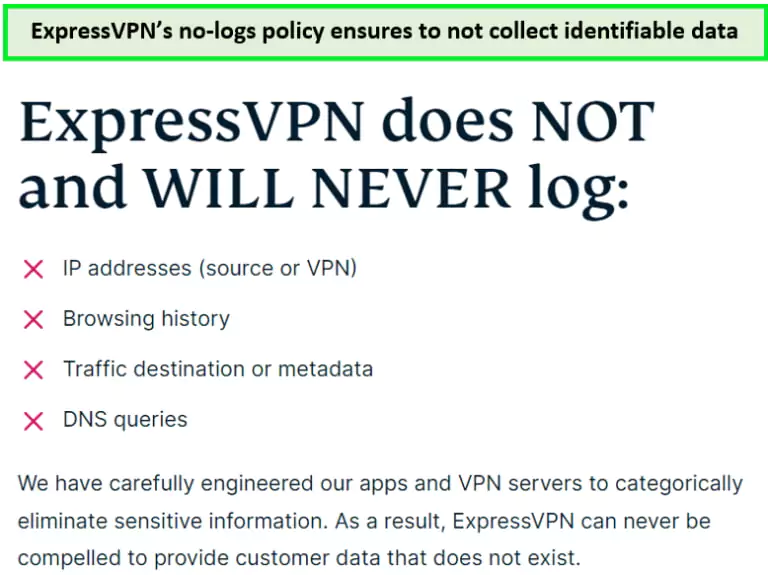
No activity or connection logs were collected either.
If you’re not aware, ExpressVPN’s zero-logs policy was tested in 2017 when the Turkish government seized one of ExpressVPN’s servers. However, they discovered nothing because no data was stored, demonstrating the legitimacy of the no-logs policy because ExpressVPN is also the best offshore VPN in USA.
ExpressVPN Independent Audits
ExpressVPN has been audited by Nettitude Audit, Cure53, PwC, and F-Secure, proving that it has a legitimate privacy policy and can be fully trusted:
- Cure53 Browser Extension Security Audit (July 2024): Cure53 conducted extensive penetration testing and code reviews on ExpressVPN’s browser extension on Chrome and Firefox, identifying and mitigating potential vulnerabilities. The audit confirmed the extension’s robust security standards for user protection.
- ExpressVPN Third-Party Audit (April 2024): Nettitude performed a comprehensive security review of ExpressVPN’s Windows app, focusing on resolving DNS leak issues. This included detailed code analysis and security testing, confirming the app’s enhanced security measures.
- Bi-Annual Transparency Reports (February 2024): ExpressVPN’s internal review process ensures all third-party data requests are documented and disclosed biannually, reinforcing their commitment to transparency and user privacy.
- Lightway Protocol Audit (November 2022): An independent security firm rigorously tested the Lightway protocol’s encryption and performance. The audit validated Lightway’s ability to provide high-speed connections without compromising on security.











Recent Comments 31
user credit card to make payment. credit card accepted. a day later, WITHOUT NOTIFICATION, expressvpn suspended the account. reason credit card verification.
they asked for a picture of the credit card.
THESE PEOPLE DO NOT VALUE YOUR PRIVACY.
If their systems are faulty, for e.g., accepting the credit card transaction then for whatever reason manually rejecting it, they cannot hold the customer responsible.
That is unfortunate. We’ll reach out to ExpressVPN to see why this might have happened. We’ll update you soon on this.
I’m from UAE and want to use Skype. Will ExpressVPN work in UAE because I have tried TorGuard and it was no help.
Yes, ExpressVPN works in the UAE and in other middle eastern countries as well. You should have no issues unblocking Skype or even WhatsApp with it.
Cheers.
I’m a T-Mobile subscriber so I usually get mlb.tv but always get blacked out when trying to get it in San Diego. How to make it work?
Hey there,
It’s not uncommon to get blocked when watching MLB.tv. To get over this issue, I suggest using a VPN. ExpressVPN works great. You can connect to a server located in Canada (preferably Toronto) on your laptop, then hook it up to your TV via Chromecast or HDMI cable to watch on the big screen.
The best option, however, would be to setup ExpressVPN on a router. This way, you can access the MLB.tv app on pretty much any device connected to your Wi-Fi network.
Hope this helps.
Hands down the best VPN around!
I started using it some time ago, and I couldn’t back off!
ExpressVPN has been providing me the best speed and service. Easy-to-use on both Windows and Android. Slightly expensive, but definitely worth it.
The expressvpn 24 7 live chat is the best among all vpns. The vpn app is great too. All other vpns lie a lot only express stands up to its claims. Expensive but reliable!!!
Hey Andrew, hope you’re doing well. You’re absolutely right. ExpressVPN is expensive, however, its service is unmatched. Nonetheless, Surfshark is also a great option if you’re on a budget. Both of these providers offer great customer support.
ExpressVPN is the only VPN I have used that works with Netflix properly. I tried using NordVPN & Private VPN and didn’t get much luck with it but with ExpressVPN, I can stream peacefully. 10/10 endorsements for it.
Thank you for this extremely detailed review. Very helpful.
The ExpressVPN video review was quite useful. I made a purchase yesterday. Hoping that it will help me stream US Netflix in Germany. Thanks. I want to ask if PPTP is secure or not
Hi Antonio,
Thank you for the kind words.
PPTP is not considered a secure choice anymore. Whenever possible, please stick with protocols like OpenVPN and IKEv2. PPTP and L2TP are outdated and they don’t offer the same level of protection as modern protocols.
We’re glad you’re enjoying ExpressVPN!
Been using expressvpn for netflix and hulu streaming and it works great for me. However its a little expensive and costly. If you have any deals or discounts please send an email i will be thankful
Hi Sina,
Thank you for your feedback!
Unfortunately, ExpressVPN rarely offers any deals and discounts, but we will surely update information on this page if they bring any new offers.
Take care of yourself!
Hey Julyian,
Glad you’re enjoying ExpressVPN. We test ExpressVPN periodically and have never come across any leaks. It is truly a well built VPN service.
ExpressVPN is indeed the best VPN for China. Its the only VPN that works in China. I’m satisfied with expressvpns performance. Good review on expressvpn
Hey there!
I couldn’t agree more with you. ExpressVPN is certainly the best. But if you want to try some other VPN service, then you might want to check out PureVPN. We’ve extensively tested the service in China and it works quite well. It also offers 12 actual servers in Beijing and Shanghai China.
Expressvpn is the only reliable VPN for china. Its the only one that works. So yeah its worth the price for me. Comes handy since everything is censored in china
Yes, Alex. ExpressVPN works great in China but they don’t have servers in the Mainland. In fact, it has 3 servers in Hong Kong. If you’re outside of China and want to access Chinese websites/content, you will need to connect to the Hong Kong server and it will work perfectly.
Dear Benedict,
Thanks for the feedback,
We are sorry that the service did not come up to your expectations. However, you should not stop using the service because you have to secure your online privacy at any cost.
Cheers!!!
Dear Juan,
Thanks for reaching out to us, we are glad that you found ExpressVPN helpful. Yes, you are right. The service offers faster speed along with extensive spread of servers.
Cheers!!!
Dear Irek,
Thanks for the feedback,
We are glad that you signed up for ExpressVPN through BitCoin. Likewise, you are the using the service along with TOR network.
Cheers!!!
Dear aky Z.
Thanks for the feedback, We are glad that you found ExpressVPN quite helpful. Keep using ExpressVPN and enjoy online freedom from anywhere.
Cheers!!!
Dear Nathaniel Elam,
Thanks for highlighting the flaw, you should download and install the updated Linux app to continue enjoying online freedom from anywhere.
Cheers!!!
Dear Kewin,
You have made a valid point because ExpressVPN has added more servers along with other salient features.
It has become a daunting task for other VPN services to compete with ExpressVPN.
Thanks for the feedback
Cheers!
Dear Jancha,
Yes, you are right, ExpressVPN provides L2TP protocol that supports Chromebook devices. The service also offers different protocols like PPTP, OpenVPN and others that you should try out.
Thanks for the feedback.
Great choice for the average user who wants fast speeds, quick connections, and a lot of different server to choose from.
Really like the service. I particulary like the Kill Switch they added to the Mac and Windows app. when is that coming to mobile?
Dear Mania,
We are happy that ExpressVPN is offering you fast speeds along with huge server network. Yes, you are right.
The Kill Switch feature is helpful when you are not connected to your VPN service and you have protect your online activities.
Keep your fingers crossed to get Kill Switch feature on your Android and iOS devices.
Cheers!!!
After some research, I decided to try a week for free with ExpressVPN to make sure it was worth the monthly fee. Turns out it really is worth is, so I picked an annual payment plan and haven’t looked back on my decision. The app does a great job keeping my data private.
ExpressVPN and I go way back. The first time I ever used a VPN was a no cost service that my colleague told me about when we went to China for a business conference. My friend and I decided that we needed some good old american entertainment to cool off after our intense days of negotiation. We would switch on our VPN and unblock Netflix, and spent hours watching movies. We binge watched entire seasons after unblocking geo-restricted websites.
We never had any problems, thanks to the 78 ExpressVPN servers. We would use a different VPN server every day and we never had any problems bypassing the great firewall. The best bit was that we could unblock Netflix US. I’d read about it in a few ExpressVPN reviews but we’d never tried this out back home in Australia and the kids were psyched when I got back home and told him that they could unblock all the movies and shows on Netflix US using ExpressVPN.
Logged in to post this comment because I’ve got a friend at work who uses another VPN service and is complaining about streaming speeds and payment issues with the service every second day. But I always say that my less-than-a-hundred ExpressVPN servers are a million times better than his hundreds.
Comments are closed.