$4.99/mo - Save 61% With Exclusive 2-Year Plan + 4 Months Free!Claim Now
How to Cancel ExpressVPN Subscription in USA in 2026: Quick Refund Guide
Last updatedFebruary 7, 2025
Muhammad Maaz
Senior Writer
Muhammad Maaz specializes in crafting insightful content on cybersecurity, unbiased VPN reviews trough extensive tests, and online privacy topics. Along with writing for the cybersecurity niche, he is passionate about sports, gaming, and staying updated on cyber trends. His interests and passion turn complex topics into engaging, practical, and informative pieces.
Muhammad Maaz specializes in crafting insightful content on cybersecurity, unbiased VPN reviews trough extensive tests, and online privacy topics. Along with writing for the cybersecurity niche, he is passionate about sports, gaming, and staying updated on cyber trends. His interests and passion turn complex topics into engaging, practical, and informative pieces.
To cancel ExpressVPN subscription in USA, simply turn off the auto-renewal in your billing settings. You won’t be charged again, but you’ll still enjoy all the benefits until your current subscription ends.
While ExpressVPN is one of the best VPN services, your needs might change over time. That’s why I’ve made this guide to help you cancel quickly and easily.
Follow these steps to cancel on any device and learn how to get a full refund.
Key Takeaways: How to Cancel ExpressVPN
ExpressVPN offers great performance and security, but it can be expensive.
To cancel: Log into the website if you bought the subscription there.
Use the mobile app store if you subscribed on your phone.
If you cancel within the first 30 days, you can ask for a refund. Your access will end right after the refund is processed.
How to Cancel ExpressVPN Subscription in USA [Updated 2026]
How to Cancel Your ExpressVPN Subscription on a Browser
If you’re not happy with ExpressVPN, you can easily cancel your subscription anytime. This works for both paid plans and free trials. Follow these simple steps:
Log in to your account and go to the My Account page.
Click on the My Subscription tab in the menu on the left.
Find and click the Edit subscription settings button.
Turn off the Auto-renew option, and follow the instructions to confirm.
Your subscription will be canceled and won’t renew when it expires. Please remember, if you’re outside the 30-day money-back guarantee, you won’t get a refund.
How to Cancel ExpressVPN Subscription and Get Money Back on iPhone
Canceling your subscription on your phone is easy. Here’s how you can do it:
Open the App Store and tap your profile picture in the top-right corner.
Even after canceling, you’ll still have access to the VPN until the end of your current billing cycle.
After that, you’ll require visiting reportaproblem.apple.com to request a refund. As soon as you log in to your account, you’ll be able to see your subscription to ExpressVPN. From there, click ‘Report a Problem’ and ask for a refund. You can inform them about the 30-day money-back guarantee of your VPN, but Apple is not bound to honor that.
2. Use ExpressVPN login with your VPN credentials: Email ID and password.
3. Toggle off Automatic Renewal under the Manage Subscription Settings.
4. Contact ExpressVPN’s customer support and request a refund.
5. Once confirmed, you will get your money back within 7 days.
How to Cancel ExpressVPN Subscription Account if Paid by BitPay?
Please note that customers using BitPay for payment will not be displayed the ‘Manage Settings’ option, and their subscription will terminate when the period is over.
How to Cancel ExpressVPN Subscription in USA Using Credit Card/PayPal?
Here’s how you can Cancel ExpressVPN Subscription if you paid for it using your credit card/PayPal account:
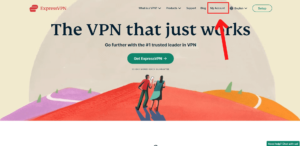
Visit ExpressVPN’s sign-in page. Go to ExpressVPN’s website and click on ‘My Account’ present at the top.
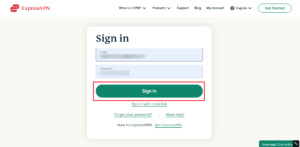
Log in to ExpressVPN. Insert your email ID and password and press ‘Sign In.’
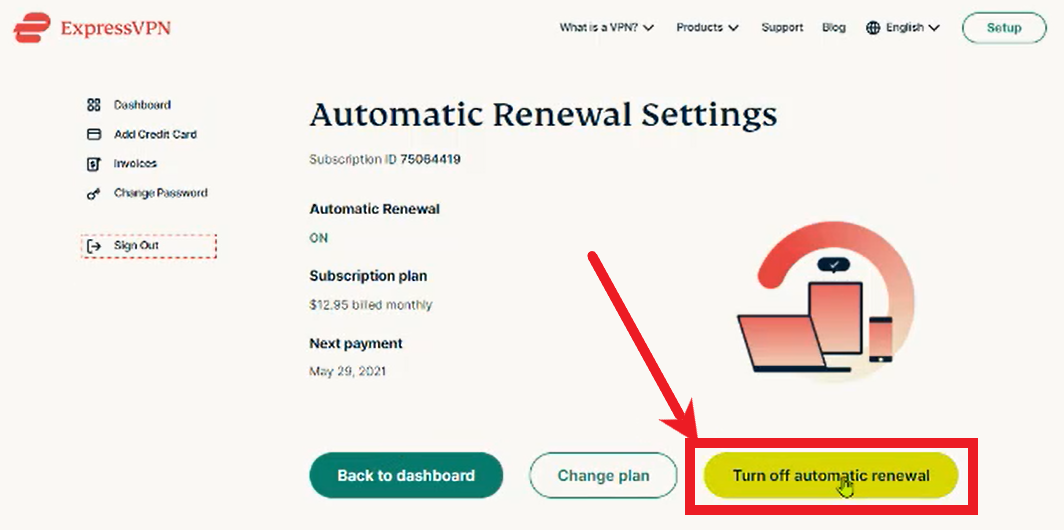
Visit your Account Details and Subscription. Then, from the left-hand menu, tap on ‘My Subscription’ > ‘Edit Subscription Settings.’
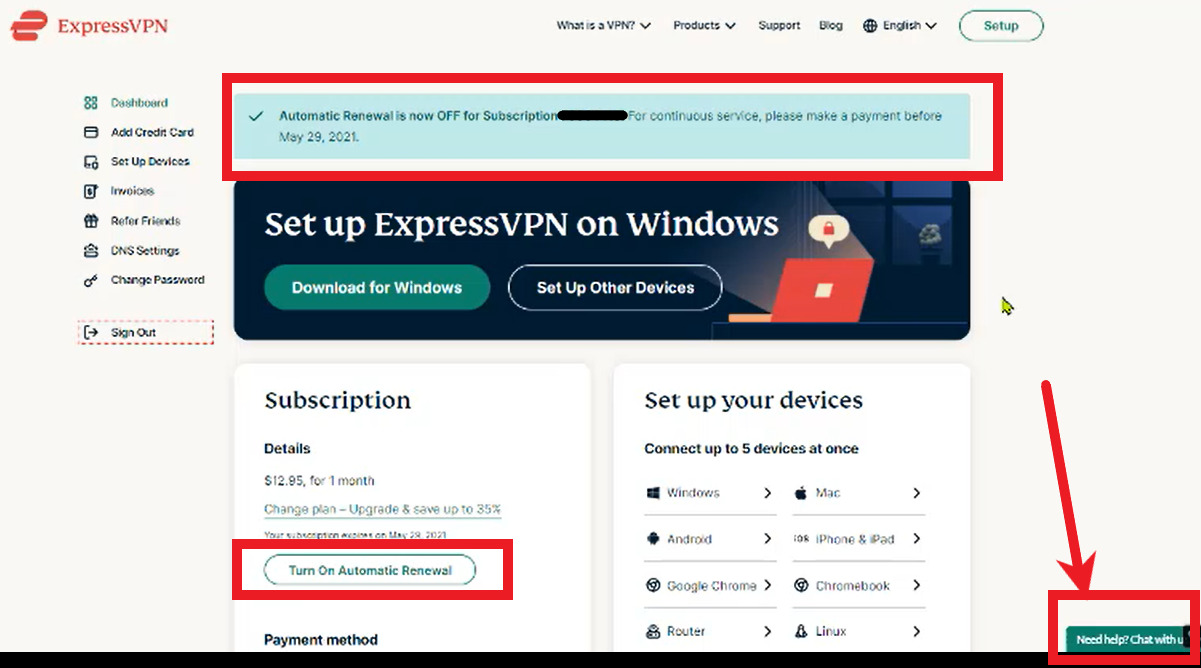
Turn off Auto-renewal. From the settings page of automatic renewal, tap ‘Turn Off Automatic Renewal.’ After that, follow all the steps until you’re notified that your subscription has been canceled. Please note that after cancelation, you’ll be able to use your account until the period ends.
How to Get a Refund From ExpressVPN?
If you bought your ExpressVPN subscription within the last 30 days, you’re eligible for a full refund through their money-back guarantee. Here’s how to claim it:
Log in to Your Account: Visit expressvpn.com, and tap the My Account button at the top. Enter your email and password to access your account.
Start a Live Chat: Once you’re logged in, tap Start a conversation from your dashboard to open a live chat with customer support.
Request a Cancellation: Let the representative know that you’d like to cancel your subscription.
Afterward, they’ll process your refund, and you’ll receive it within seven business days in your bank or credit card account.
Reasons Your ExpressVPN Refund Might Be Denied
While ExpressVPN offers a clear refund policy, there are a few situations where your refund could be denied. Here’s what to watch out for:
Purchased Through the Apple App Store: If you bought ExpressVPN using the Apple App Store, ExpressVPN won’t handle refunds directly. Instead, you’ll need to request a refund through the Apple App Store.
Request Made After the 30-Day Guarantee Period: ExpressVPN’s refund policy only covers the first 30 days. If you ask for a refund after that time, your request will likely be denied. Make sure to submit your request on time.
Pro Tip: Some users on Reddit have shared that their PayPal accounts kept being charged even after they canceled the automatic renewal on ExpressVPN’s website. To avoid this, also stop Instant Payment Notifications in your PayPal settings under your ExpressVPN account.
By keeping these things in mind, you can ensure a smooth refund process!
What is the ExpressVPN Money-Back Guarantee?
ExpressVPN offers a 30-day money-back guarantee. If you’re not fully satisfied, you can request a refund within 30 days. Simply contact their 24/7 live chat to get your money back.
Best Alternatives to ExpressVPN in USA
If ExpressVPN isn’t the right match for you, then there are a few excellent alternatives you need to look into:
Surfshark – Budget-friendly VPN with Unlimited Multi-logins
Surfshark is a great affordable alternative to ExpressVPN. Despite its lower price, Surfshark offers fast speeds and strong security for all your online activities, like streaming Netflix, gaming, torrenting, or staying safe from cyber threats.
In my Surfshark speed test in USA, it performed really well. It ran smoothly without dropping speeds below 30%.
For security, Surfshark has amazing features like CleanWeb and MultiHop, keeping you safe. I checked for DNS and IP leaks, and there were none, meaning your data stays protected.
What’s even better? Surfshark allows unlimited connections on one account, something not many VPNs offer! It works on Windows, macOS, Android, iOS, Firestick, Roku, PS4, Xbox, Chromebook, and routers.
NordVPN is known for its strong security and privacy features, making it a reliable alternative to ExpressVPN. It offers a huge network of over 6000 servers in 61 countries, ensuring you stay safe online.
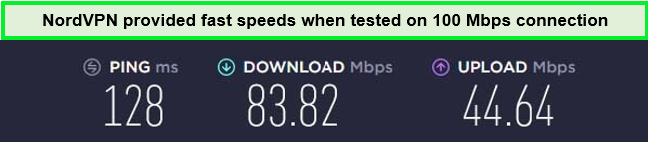
In my NordVPN speed test in USA, I saw great results: a download speed of 83.82 Mbps and an upload speed of 44.64 Mbps on a 100 Mbps connection.
NordVPN also includes privacy-boosting features like Onion over VPN, CyberSec, and Double VPN to further protect your online activity. It provides strong IP and DNS leak protection, passing all tests with ease, showing it truly keeps your privacy intact.
This VPN works with Windows, Mac, Android, iOS, Firestick, and Android TVs, letting you secure multiple devices with one account, which means better protection across all your gadgets.
CyberGhost is easy to use and offers a great alternative to ExpressVPN. It has dedicated servers for streaming, torrenting, and online gaming, making everything simple and smooth.
With its large network of over 11651+ servers in 100 countries, you can enjoy all your favorite streaming platforms. These servers are specially designed to help you watch shows without errors.
When I tested CyberGhost speed test in USA, I got a download speed of 75.47 Mbps and an upload speed of 69.34 Mbps on a 100 Mbps connection. This means you can watch your favorite shows or browse online without any buffering or lag.
CyberGhost keeps your online activity private with a strict no-log policy and uses military-grade AES-256-bit encryption. It also has DNS and IPv6 leak protection to keep you safe. After running tests, I found no leaks.
You can use CyberGhost on up to seven devices at once, and it’s compatible with Windows, Mac, Android, iOS, and more. This way, you can protect all your devices with one subscription.
How long until I get my money back after canceling ExpressVPN?
You’ll usually get your refund within 7 business days, depending on your bank. I got mine in just 3 days, and PayPal refunds are even faster, often within 1 business day.
Can you cancel ExpressVPN and get a refund at any time?
Yes, if you’re still within the 30-day guarantee period. Your subscription will end immediately after cancellation, and you’ll lose access to any remaining days.
Is it easy to cancel your ExpressVPN subscription?
Yes, it’s super easy. Just contact 24/7 live chat support, and you can cancel within minutes. Make sure to do it within the 30-day refund window.
Can I cancel ExpressVPN after the free trial in USA?
After your free trial has ended, you can cancel your ExpressVPN subscription and claim a refund as long as you’re within the time period of 30 days in USA.
Do I need to cancel auto-renewal to get my ExpressVPN refund?
No, auto-renewal will stop automatically when you request a refund. However, you can still manually turn off auto-renewal to prevent future charges.
Do I also need to cancel my ExpressVPN free mobile trial?
Yes, cancel the free trial if you don’t want to subscribe, or you’ll be charged. You can still request a refund within the 30-day guarantee if you forget.
Can I get a refund if I paid with Bitcoin?
Yes, ExpressVPN will refund in Bitcoin, though the amount might differ due to BTC value changes.
Conclusion
If you’re considering to cancel ExpressVPN subscription in USA, you’re not alone. While it’s a popular choice, it might not meet everyone’s needs. Luckily, there are many great alternatives available.
If you’re aiming for a free service, check out my Windscribe review in USA. And if ease of use is your top priority, explore my list of the best VPNs for beginners in USA. If you have any questions, feel free to leave a comment. Thank you for reading!





Recent Comments 1
Thank you for the helpful tutorial.
Comments are closed.