Does Surfshark Offer a Free Trial? Yes, Surfshark VPN provides a 7-day free trial for macOS, iOS, and Android platforms. Regardless of the platform you choose, there is a 30-day money-back guarantee offered. Basically, Surfshark offers the following services to its customers:
- The free Surfshark 7-day trial for Android, iOS, and macOS platforms
- The 30-Day Money-Back Guarantee on all different platforms
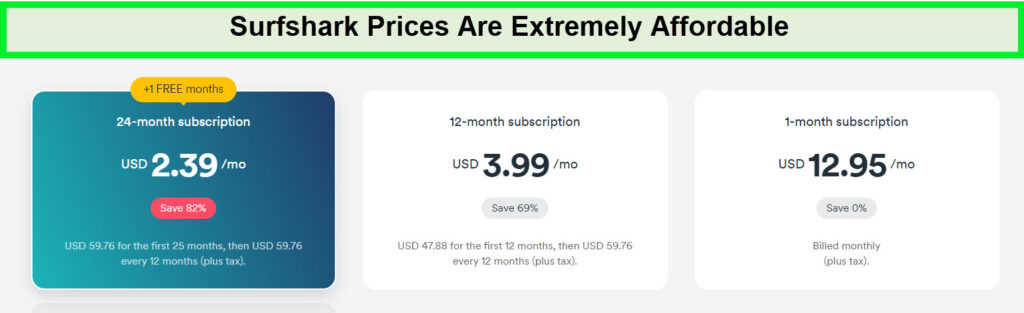
Surfshark is one of the cheapest VPN services, costing only $2.49/mo on its 2-year subscription plan. But if you’re skeptical about its performance and don’t want to purchase a long-term subscription, you can go for the Surfshark free trial.
In case you’d like something a bit more extensive, then you can always opt for its risk-free 30-day money-back guarantee as the period is longer than a free Surfshark 7-day trial, you have a full month which will be enough to get the grip with the features and user interface. But remember to cancel Surfshark and claim a refund before the 30 days are over.
Surfshark offers super-fast speeds, excellent unblocking capabilities, and robust security, as per our Surfshark review and this guide will tell you how to get a Surfshark VPN free trial to test its capabilities and feature before subscribing to it full-time. So, without further ado, let’s go!
How to Get Surfshark Free Trial: Quick Steps
Here is how to get a Surfshark free trial for 7 days on Android, iOS, and macOS:
- Install the Surfshark app from the Apple App Store or Google Play Store (The 7-day free trial is available on iOS, Android, and macOS only).
- Launch the app and click on Start free trial.”
- Create your Surfshark account and choose the 12-month option.
7-day trial of Surfshark (Depth Guide) | Surfshark 30-day refund (Guide)
How Do You Get the Surfshark 7-day free trial?
Since the 7-day Surfshark VPN free trial is exclusively available on iOS, Android, and macOS devices, you can sign up for it through the Google Play Store for Android and Apple App Store for iOS and Mac.
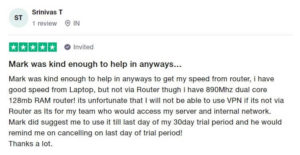
While there is no direct Surfshark free trial for Windows, once you’ve registered for the trial, you can easily download Surfshark on Firestick, Surfshark on Apple TV, Windows devices, Kodi, or Roku, and use the exact account information to sign in to the free trial on these devices.
Since Surfshark offers unlimited simultaneous connections, you can use it on all your devices. However, the VPN will ask for your card details but won’t charge you until the 7-day period is over.
7 days free trial of Surfshark on iOS devices
Now, follow the steps below to get the Surfshark VPN free trial on iOS devices :
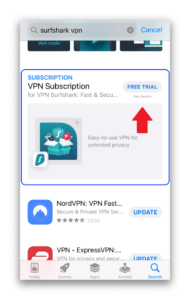
1. Open the Apple App Store and search ‘Surfshark.’ Then, scroll down till you find ‘Free Trial’ under Subscription.
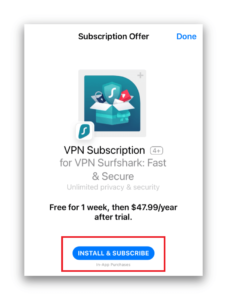
2. Click on Free Trial. Don’t click the image accompanying it, as it will direct you to the regular download of Surfshark. Once you select it, you’ll be led to a tab displaying a subscription plan.
3. Click on Install & Subscribe. The VPN will start downloading and will take you to the installed app once done.
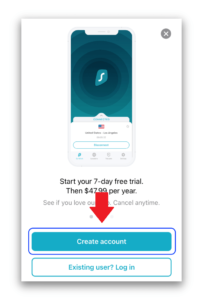
4. Tap Create Account. Insert your email ID and form a password. These account details would be similar to that you’d use to sign in to other apps of Surfshark.
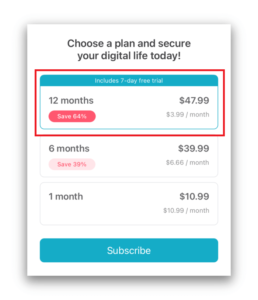
5. After account setting up your credentials, you’ll be required to select a subscription plan. You’d have to choose the 12-month plan to get the Surfshark VPN free trial.
6. The app of Surfshark will now be available on your iOS. You can use your created account to sign in to the website of Surfshark and install all its other applications.
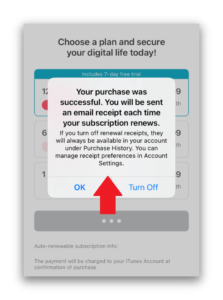
Thinking about how to cancel Surfshark free trial iOS? Well, once the 7-day period is over, you will be charged for the subscription via your account on iTunes. To avoid that, Surfshark free trial Reddit suggests that you cancel Surfshark free trial six days within the trial or at least 24 hours before the expiration.
7 days free trial of Surfshark on Android devices
Here is how to get Surfshark free trial on Android:
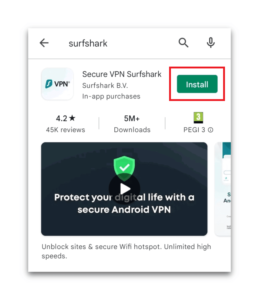
1. Open the Google Play Store and search for ‘Surfshark.’ Then, click Install.
2. Once the download is complete, tap Open.
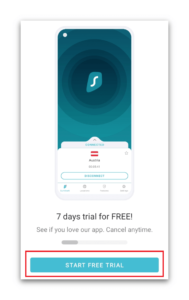
3. You will be directed to the home screen of Surfshark’s Android app. Click ‘Start Free Trial,’ enter your email ID, and create a password.
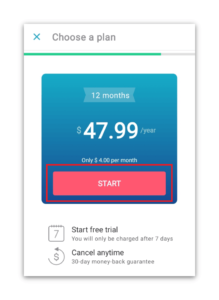
4. Just like iOS, you need to choose the annual plan of Surfshark to qualify for the free trial. Click Start under the 12-month plan.
5. Choose your payment method and click Subscribe. You’ll immediately be directed to the Surfshark app, where you can start using your free trial.
Please note that the process of how to cancel Surfshark free trial on Android, much like iOS, does not require you to cancel Surfshark trial a day before its expiration. You can even cancel it on the 7th day, and you’ll be good to go.
Surfshark 7-Day Free Trial Pros and Cons
Let’s look at a few pros and cons of the Surfshark 7-day trial:
Pros
- Surfshark won’t charge you before 7 days
- You won’t require requesting a refund
- You can enjoy all its premium features
- You don’t have to access customer support for cancelation
- You’re always eligible for its 30-day refund policy if you forget to cancel your free trial
Cons
- You can only test the VPN for 6 days
- You can’t get Surfshark free trial with no credit card details
- You will be charged if you don’t cancel the trial on time
- Surfshark trial is not on PC
How to Get Surfshark’s 30 days Money-Back Guarantee
You can try Surfshark for more than 7 days by purchasing a subscription and availing the refund within 30 days. To claim Surfshark’s 30-day free trial, here’s what you need to do.
1. Visit the Surfshark VPN free trial page.
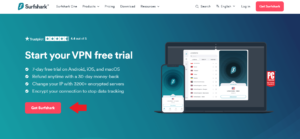
2. Press the red-colored ‘Get Surfshark’ button and register for an account. Select a plan – you get the 24 months, 12 months, and 1-month options to choose from. However, it doesn’t matter which plan you select since you’d be getting a Surfshark refund after 30 days.
3. Insert your email address and select your preferred payment method. Surfshark accepts PayPal, credit cards, Google Pay, AliPay, and multiple types of cryptocurrencies.
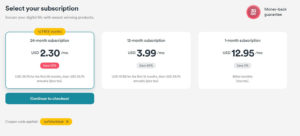
4. Enjoy circumventing geo-restrictions, watching your favorite content with super-fast speeds as we have witnessed in our Surfshark speed test, and securely browsing the internet for 30 days! Surfshark’s CleanWeb feature ensures a smooth browsing journey, protecting you from unwanted distractions making it the one of the Best VPNs with CleanWeb.
Surfshark’s 30-Day Free Trial Pros and Cons
Following are the pros and cons of Surfshark’s 30-day money-back guarantee:
Pros
- You can enjoy Surfshark’s service for an entire month
- Surfshark pricing packages are low cost, so the initial subscription won’t cost an arm
- You can enjoy all its premium features
- The refund process is pretty simple and quick
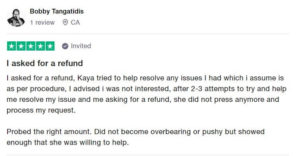
- Your money will be refunded without any questions
- This Surfshark VPN free trial is available on Windows and other devices
Cons
- You have to pay a subscription fee (which will be refunded later)
- You have to wait for 2-6 business days for your reimbursement
How Do I Cancel my Free Trial of Surfshark?
Generally, you can cancel your Surfshark VPN free trial simply by following these steps:
- Sign in to your account and access your profile by clicking on the icon. From there, select the Subscription option.
- Within the Subscription section, you will find your current active subscription along with the ability to terminate it if desired.
- By clicking on the Cancel Subscription option, you can confirm your decision to stop all recurring payments associated with Surfshark.
Too quick to handle? Don’t worry, we have a detailed guide to cancel your Surfshark VPN free trial for you below.
If you’ve registered for a free trial using the Google Play Store/Apple App Store, then the subscription will auto-renew once the seven days are over. To avoid being charged, you need to disable auto-renew or cancel your subscription a day prior to the expiration date.
Let’s look at how you can cancel your Surfshark trial on your mobile and Mac devices:
How to Cancel a Surfshark 7-day Free Trial on iOS
Here’s how you can cancel your Surfshark 7-day trial on iOS:
- Visit your iOS Settings.
- Select your Apple ID account name by tapping on it.
- Locate the active Surfshark subscription.
- Select Surfshark VPN” and scroll down until you find the option to Cancel Free Trial.”